7. メタデータレジストリとJSON Schema双方向変換
Zod v4では、ファーストクラスの メタデータレジストリ機構 (z.registry() & z.globalRegistry)、外部ライブラリ不要の JSON Schema双方向変換 (z.toJSONSchema() & z.fromJSONSchema())、そして Standard Schema v1 (~standard) のネイティブ実装が導入されました。これにより、単一のZodスキーマをランタイム検証・OpenAPI仕様書・LLMのStructured Outputs(ツール定義)・フルスタックのフォームライブラリでそのまま共有できます。
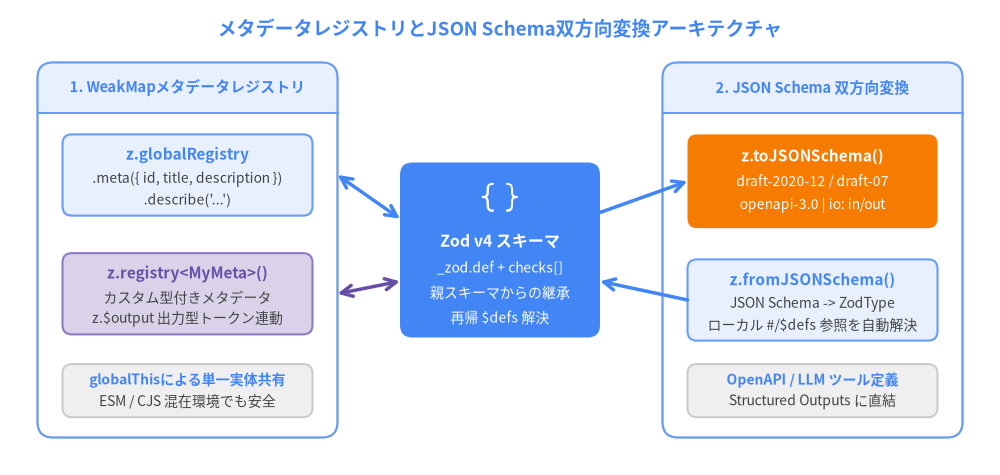
Source Code
from drawlib.canvas import save, setup
from drawlib.icons import phosphor
from drawlib.lines import line
from drawlib.shapes import rectangle
from drawlib.smartarts import Panel
from drawlib.styles import Colors, Styles
from drawlib.text import text

setup(width=160, height=76)

text(
    (80, 71.5),
    "メタデータレジストリとJSON Schema双方向変換アーキテクチャ",
    style=Styles.PrimaryBold.patch(text_size=13.5),
)

# Left Panel: Metadata Registries
Panel(
    "1. WeakMapメタデータレジストリ",
    style=Styles.Neutral.patch(shape_fill_color=Colors.White),
    header_style=Styles.PrimaryNeutral,
    text_style=Styles.PrimaryBold.patch(text_size=10.5),
    header_align="center",
).draw((6, 6), width=48, height=60)

rectangle((30, 48), width=40, height=13, style=Styles.PrimaryNeutral.patch(shape_r=1.5))
text((30, 51.2), "z.globalRegistry", style=Styles.PrimaryBold.patch(text_size=11.0))
text((30, 47.4), ".meta({ id, title, description })", style=Styles.Neutral.patch(text_size=10.0))
text((30, 44.0), ".describe('...')", style=Styles.Neutral.patch(text_size=10.0))

rectangle((30, 29), width=40, height=13, style=Styles.SecondaryNeutral.patch(shape_r=1.5))
text((30, 32.2), "z.registry<MyMeta>()", style=Styles.SecondaryBold.patch(text_size=11.0))
text((30, 28.4), "カスタム型付きメタデータ", style=Styles.Neutral.patch(text_size=10.0))
text((30, 25.0), "z.$output 出力型トークン連動", style=Styles.Neutral.patch(text_size=10.0))

rectangle((30, 13.5), width=40, height=8.5, style=Styles.Neutral.patch(shape_r=1.5))
text((30, 15.2), "globalThisによる単一実体共有", style=Styles.PrimaryBold.patch(text_size=10.0))
text((30, 11.8), "ESM / CJS 混在環境でも安全", style=Styles.Neutral.patch(text_size=10.0))

# Center hub: Zod v4 Schema AST
rectangle((80, 36), width=32, height=28, style=Styles.PrimaryFlat.patch(shape_r=2.0))
phosphor.brackets_curly((80, 44.5), width=6.0, style=Styles.White)
text((80, 37.5), "Zod v4 スキーマ", style=Styles.WhiteBold.patch(text_size=11.5))
text((80, 33.2), "_zod.def + checks[]", style=Styles.White.patch(text_size=10.0))
text((80, 29.2), "親スキーマからの継承", style=Styles.White.patch(text_size=10.0))
text((80, 25.2), "再帰 $defs 解決", style=Styles.White.patch(text_size=10.0))

line((54, 48), (64, 41), arrow_head="<->", style=Styles.PrimaryBold)
line((54, 29), (64, 31), arrow_head="<->", style=Styles.SecondaryBold)

# Right Panel: Bidirectional JSON Schema
Panel(
    "2. JSON Schema 双方向変換",
    style=Styles.Neutral.patch(shape_fill_color=Colors.White),
    header_style=Styles.PrimaryNeutral,
    text_style=Styles.PrimaryBold.patch(text_size=10.5),
    header_align="center",
).draw((106, 6), width=48, height=60)

rectangle((130, 47), width=40, height=15, style=Styles.AccentFlat.patch(shape_r=1.5))
text((130, 51.0), "z.toJSONSchema()", style=Styles.WhiteBold.patch(text_size=11.0))
text((130, 47.0), "draft-2020-12 / draft-07", style=Styles.White.patch(text_size=10.0))
text((130, 43.2), "openapi-3.0 | io: in/out", style=Styles.White.patch(text_size=10.0))

rectangle((130, 28), width=40, height=13, style=Styles.PrimaryNeutral.patch(shape_r=1.5))
text((130, 31.2), "z.fromJSONSchema()", style=Styles.PrimaryBold.patch(text_size=11.0))
text((130, 27.4), "JSON Schema -> ZodType", style=Styles.Neutral.patch(text_size=10.0))
text((130, 24.0), "ローカル #/$defs 参照を自動解決", style=Styles.Neutral.patch(text_size=10.0))

rectangle((130, 13.5), width=40, height=8.5, style=Styles.Neutral.patch(shape_r=1.5))
text((130, 15.2), "OpenAPI / LLM ツール定義", style=Styles.PrimaryBold.patch(text_size=10.0))
text((130, 11.8), "Structured Outputs に直結", style=Styles.Neutral.patch(text_size=10.0))

line((96, 42), (110, 47), arrow_head="->", style=Styles.PrimaryBold)
line((110, 28), (96, 31), arrow_head="->", style=Styles.PrimaryBold)

save()
1. メタデータレジストリ (z.globalRegistry & .meta())
Zod v4では、スキーマインスタンス自体に任意のドキュメント用プロパティを直接保持するのではなく、WeakMapベースのレジストリ ($ZodRegistry) にメタデータを格納します。この設計により、一時的に生成されたスキーマのガベージコレクションを妨げることなく、メタデータを疎結合かつ型安全に管理できます。
.meta() と .describe() による z.globalRegistry への登録
Classic版のすべてのZodスキーマには .meta(metadata) および .describe(text) メソッドが用意されており、呼び出すと z.globalRegistry にメタデータが登録されます(globalThis.__zod_globalRegistry に保持されるため、ESMとCJSが混在するモノレポ環境でも単一のインスタンスが共有されます):
import * as z from "zod";

const EmailSchema = z.email().meta({
  id: "EmailAddress",
  title: "メールアドレス",
  description: "アカウントの主要連絡先メールアドレス",
  examples: ["alice@example.com"],
});

// スキーマから直接、または z.globalRegistry からメタデータを取得
console.log(EmailSchema.meta());
// { id: "EmailAddress", title: "メールアドレス", description: "...", examples: [...] }

// .describe() は .meta({ description: "..." }) のショートハンドです
const UsernameSchema = z.string().min(3).describe("公開ハンドル名");
console.log(z.globalRegistry.get(UsernameSchema)?.description);
// "公開ハンドル名"
メタデータの継承ルール:
.optional()・.nullable()・.refine()などで派生スキーマを作成した場合、registry.get(derivedSchema)は親スキーマのメタデータを自動的に引き継ぎます。ただし、JSON Schema出力時の$defsID重複を防ぐため、idプロパティだけは派生スキーマへ継承されません。
2. カスタム型付きレジストリ (z.registry<Meta>())
フォームビルダー、ORMのカラム定義、CLIパーサーなどを構築する場合は、z.registry<Meta, Schema>() を使って独自の型付きレジストリを作成できます。
メタデータの型定義内で特殊シンボル z.$output および z.$input を使用すると、登録される各スキーマの推論出力型・入力型に自動的に置き換えられます:
import * as z from "zod";

// 各スキーマの推論出力型 (z.$output) に連動するメタデータインターフェース
interface FormFieldMeta {
  label: string;
  placeholder?: string;
  defaultValue?: z.$output;
  examples?: z.$output[];
  validateOnBlur?: boolean;
}

const formRegistry = z.registry<FormFieldMeta>();

const AgeField = z.number().int().min(0);
const NameField = z.string().min(1);

// 型チェック有効! AgeField の defaultValue と examples は `number` 型が要求されます
formRegistry.add(AgeField, {
  label: "年齢",
  defaultValue: 25,
  examples: [18, 25, 40],
});

// 型チェック有効! NameField の defaultValue は `string` 型が要求されます
formRegistry.add(NameField, {
  label: "氏名",
  placeholder: "山田 太郎",
  defaultValue: "山田 太郎",
});

// 型安全なメタデータ取得
const ageMeta = formRegistry.get(AgeField);
// ageMeta?.defaultValue は `number | undefined` として推論されます
また、メソッドチェーンの途中で schema.register(myRegistry, meta) を使ってインライン登録することも可能です:
const RoleField = z
  .enum(["admin", "editor", "viewer"])
  .register(formRegistry, {
    label: "ワークスペース権限",
    defaultValue: "viewer",
  });
3. ZodからJSON Schemaへの変換 (z.toJSONSchema())
Zod v4には、サードパーティの zod-to-json-schema を置き換える公式の z.toJSONSchema(schemaOrRegistry, params?) エンジンが標準搭載されています。
import * as z from "zod";

const UserSchema = z
  .object({
    id: z.uuid(),
    name: z.string().min(1),
    role: z.enum(["admin", "user"]).default("user"),
    tags: z.array(z.string()).optional(),
  })
  .meta({
    id: "User",
    title: "User Account",
    description: "プラットフォーム登録済みユーザー",
  });

const jsonSchema = z.toJSONSchema(UserSchema);
/*
{
  "$schema": "https://json-schema.org/draft/2020-12/schema",
  "id": "User",
  "title": "User Account",
  "description": "プラットフォーム登録済みユーザー",
  "type": "object",
  "properties": {
    "id": { "type": "string", "format": "uuid", "pattern": "..." },
    "name": { "type": "string", "minLength": 1 },
    "role": { "type": "string", "enum": ["admin", "user"], "default": "user" },
    "tags": { "type": "array", "items": { "type": "string" } }
  },
  "required": ["id", "name", "role"],
  "additionalProperties": false
}
*/
主な変換オプション (ToJSONSchemaParams)
| オプション | 指定可能な値 | デフォルト | 動作内容 |
|---|---|---|---|
target |
"draft-2020-12" | "draft-07" | "draft-04" | "openapi-3.0" |
"draft-2020-12" |
$schema URI、OpenAPI 3.0向けの nullable: true、prefixItems / items、$defs / definitions の出力形式を切り替えます。 |
io |
"output" | "input" |
"output" |
"output" は変換・デフォルト適用後の型(.default() 付きフィールドも required に含まれる)を出力し、"input" は入力時の型(.default() 付きフィールドは任意)を出力します。 |
unrepresentable |
"throw" | "any" | (ctx) => ... |
"throw" |
JSONで表現できない型(z.bigint(), z.date(), z.map(), z.symbol(), z.transform() など)の扱い。"any" を指定すると例外を投げずに {} を出力します。 |
cycles |
"ref" | "throw" |
"ref" |
z.lazy() やgetterを用いた再帰スキーマを検知し、自動的に $defs への JSON Pointer $ref として出力します。 |
reused |
"inline" | "ref" |
"inline" |
"ref" を指定すると、複数箇所で共有されているサブスキーマを自動的に $defs に抽出します(.meta({ id }) を持つスキーマは常に名前付きで抽出されます)。 |
metadata |
$ZodRegistry |
z.globalRegistry |
メタデータや id の参照元となるレジストリを指定します。 |
override |
(ctx) => void |
— | { zodSchema, jsonSchema, path } を受け取り、独自の x-* 拡張プロパティ等を注入できるフック関数です。 |
再帰スキーマとレジストリ一括出力
.meta({ id: "Category" }) のように id を付与しておくと、再帰スキーマや共有スキーマが #/$defs/Category という分かりやすい名前で抽出されます。また、z.toJSONSchema(registry) にレジストリ全体を渡して複数スキーマを一括変換することも可能です:
import * as z from "zod";

const Category = z
  .object({
    name: z.string(),
    get subcategories() {
      return z.array(Category);
    },
  })
  .meta({ id: "Category" });

const treeJsonSchema = z.toJSONSchema(Category, {
  target: "draft-2020-12",
  cycles: "ref",
});
// `$defs.Category` が生成され、"subcategories" は `{ "type": "array", "items": { "$ref": "#/$defs/Category" } }` となります
4. JSON SchemaからZodスキーマへの逆変換 (z.fromJSONSchema())
Zod v4のClassicパッケージ(zod)には、外部のJSON Schemaドキュメント(Draft 2020-12、Draft 7、Draft 4、OpenAPI 3.0)から実行時の ZodType バリデータを構築する z.fromJSONSchema(jsonSchema, params?) も用意されています。ローカルの #/$defs/... や #/definitions/... 参照も自動的に解決されます:
import * as z from "zod";

const rawJsonSchema = {
  $schema: "https://json-schema.org/draft/2020-12/schema",
  type: "object",
  properties: {
    productId: { type: "string", format: "uuid" },
    price: { type: "number", minimum: 0, exclusiveMinimum: 0 },
    tags: { type: "array", items: { type: "string" }, minItems: 1 },
  },
  required: ["productId", "price"],
  additionalProperties: false,
};

// JSON SchemaからランタイムZodスキーマを再構築
const ProductSchema = z.fromJSONSchema(rawJsonSchema);

const parsed = ProductSchema.safeParse({
  productId: "550e8400-e29b-41d4-a716-446655440000",
  price: 29.99,
  tags: ["typescript"],
});
console.log(parsed.success); // true
5. Standard Schema v1 & Standard JSON Schema v1 (~standard)
Zod v4のすべてのスキーマ(zod および zod/mini)は、バリデーションライブラリ横断の共通規格である Standard Schema v1 と Standard JSON Schema v1 を schema["~standard"] プロパティとして標準実装しています。
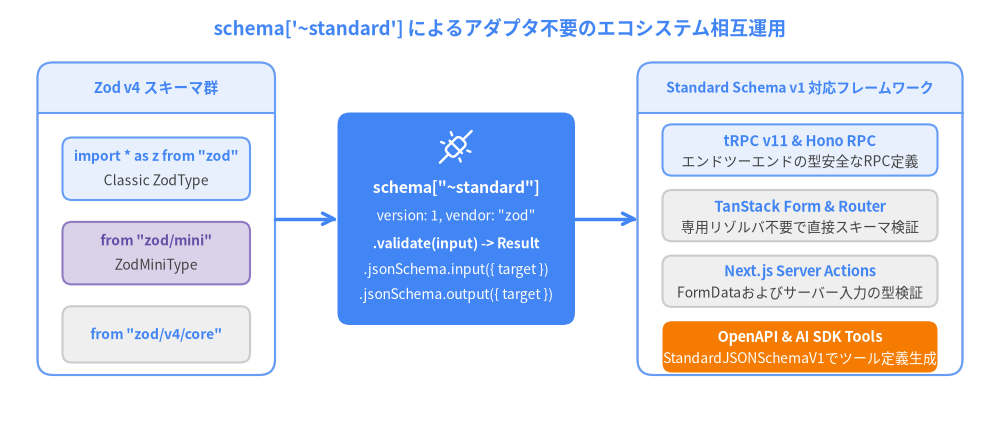
schema["~standard"] の直接利用パターン
フレームワーク開発者や汎用ライブラリ作成者は、Zodパッケージに直接依存することなく、~standard インターフェース経由でバリデーションとJSON Schema生成の両方を実行できます:
import * as z from "zod";
import type { StandardSchemaWithJSON } from "zod/v4/core";

const OrderSchema = z.object({
  orderId: z.uuid(),
  quantity: z.number().int().min(1),
});

// 任意の Standard Schema v1 + Standard JSON Schema v1 を受け取る汎用関数
async function executeTool<S extends StandardSchemaWithJSON>(
  schema: S,
  rawPayload: unknown
) {
  const std = schema["~standard"];

  // 1. LLMのツール呼び出し定義向けに Draft 2020-12 JSON Schema を生成
  const inputJsonSchema = std.jsonSchema.input({ target: "draft-2020-12" });

  // 2. Standard Schema v1 インターフェースで入力値を検証
  const result = await std.validate(rawPayload);
  if (result.issues) {
    throw new Error(z.prettifyError(result));
  }

  return {
    toolSchema: inputJsonSchema,
    verifiedData: result.value,
  };
}
次のステップ
- 8. zod/miniによるTree-ShakingとJITコンパイル へ進み、
zod/miniによる約2KBの極小バンドル化とzod/compileによるJIT高速化を学びましょう。 - 6. エラー整形と49言語i18nロケール に戻ってエラー整形APIを確認することもできます。