5. リファインメント・パイプライン・双方向Codec
実世界のバリデーションでは、単なる構造や型のチェック以上の要件が頻繁に発生します。パスワードと確認用フィールドの一致検証、文字列のインプレース正規化、フォーム入力値からドメインモデルへの多段階パイプライン変換、そして通信フォーマット(JSON文字列、ISO 8601タイムスタンプ、URLSearchParams)とJavaScriptの実行時オブジェクト(Date、Map、型付きドメインモデル)の間の双方向シリアライズ/デシリアライズなどです。
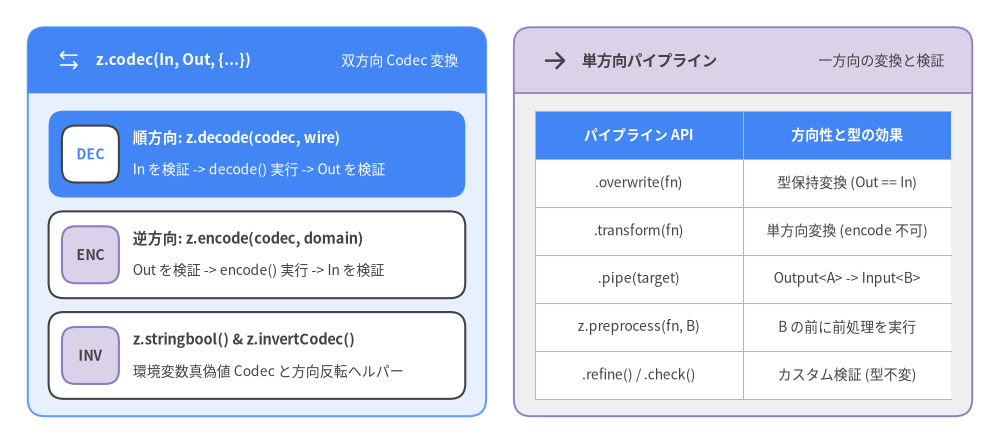
Zod v4は、カスタム検証フック(.refine()、.superRefine()、.check())、型を保持するインプレース変換(.overwrite())、単方向パイプライン(.transform()、.pipe())、そして**ファーストクラスの双方向Codec(z.codec()、z.decode()、z.encode())**を統合しています。
Source Code
from drawlib.canvas import save, setup
from drawlib.icons import phosphor
from drawlib.smartarts import CardList, Panel, Table
from drawlib.styles import Styles

setup(width=144, height=64)

left_panel = Panel(
    "z.codec(In, Out, {...})",
    "双方向 Codec 変換",
    style=Styles.PrimaryNeutral,
    header_style=Styles.PrimaryFlat,
    text_style=Styles.WhiteBold.patch(text_size=11.0),
    description_style=Styles.White.patch(text_size=10.0),
    icon=phosphor.arrows_left_right,
    icon_style=Styles.White,
    header_variant="filled",
    header_height=9.5,
)
left_panel.draw((4.0, 4.0), width=66.0, height=56.0, align="bottom_left")
l_xy, l_w, l_h = left_panel.get_content_box(
    (4.0, 4.0), width=66.0, height=56.0, padding=(3.0, 2.5), align="bottom_left"
)

codec_cards = CardList(
    style=Styles.White,
    text_style=Styles.DarkBold.patch(text_size=10.5),
    description_style=Styles.Dark.patch(text_size=10.0),
    badge_style=Styles.SecondaryNeutral,
    badge_text_style=Styles.DarkBold.patch(text_size=10.0),
    spacing=2.0,
)
codec_cards.add(
    "順方向: z.decode(codec, wire)",
    "In を検証 -> decode() 実行 -> Out を検証",
    badge_text="DEC",
    style=Styles.PrimaryFlat,
    text_style=Styles.WhiteBold.patch(text_size=10.5),
    description_style=Styles.White.patch(text_size=10.0),
    badge_style=Styles.White,
    badge_text_style=Styles.PrimaryBold.patch(text_size=10.0),
)
codec_cards.add(
    "逆方向: z.encode(codec, domain)",
    "Out を検証 -> encode() 実行 -> In を検証",
    badge_text="ENC",
)
codec_cards.add(
    "z.stringbool() & z.invertCodec()",
    "環境変数真偽値 Codec と方向反転ヘルパー",
    badge_text="INV",
)
codec_cards.draw(l_xy, width=l_w, height=l_h)

right_panel = Panel(
    "単方向パイプライン",
    "一方向の変換と検証",
    style=Styles.Neutral,
    header_style=Styles.SecondaryNeutral.patch(shape_line_width=1.2),
    text_style=Styles.DarkBold.patch(text_size=11.0),
    description_style=Styles.Dark.patch(text_size=10.0),
    icon=phosphor.arrow_right,
    icon_style=Styles.DarkBold,
    header_variant="filled",
    header_height=9.5,
)
right_panel.draw((74.0, 4.0), width=66.0, height=56.0, align="bottom_left")
r_xy, r_w, r_h = right_panel.get_content_box(
    (74.0, 4.0), width=66.0, height=56.0, padding=(3.0, 2.5), align="bottom_left"
)

pipe_table = Table(
    cell_style=Styles.White,
    text_style=Styles.Dark.patch(text_size=10.0),
    header_cell_style=Styles.PrimaryFlat,
    header_text_style=Styles.WhiteBold.patch(text_size=10.0),
    border_style=Styles.MutedThin,
)
pipe_table.draw(
    xy=r_xy,
    width=r_w,
    height=r_h,
    align="bottom_left",
    data=[
        ["パイプライン API", "方向性と型の効果"],
        [".overwrite(fn)", "型保持変換 (Out == In)"],
        [".transform(fn)", "単方向変換 (encode 不可)"],
        [".pipe(target)", "Output<A> -> Input<B>"],
        ["z.preprocess(fn, B)", "B の前に前処理を実行"],
        [".refine() / .check()", "カスタム検証 (型不変)"],
    ],
)

save()
5.1 カスタム検証:.refine()、.superRefine()、.check()
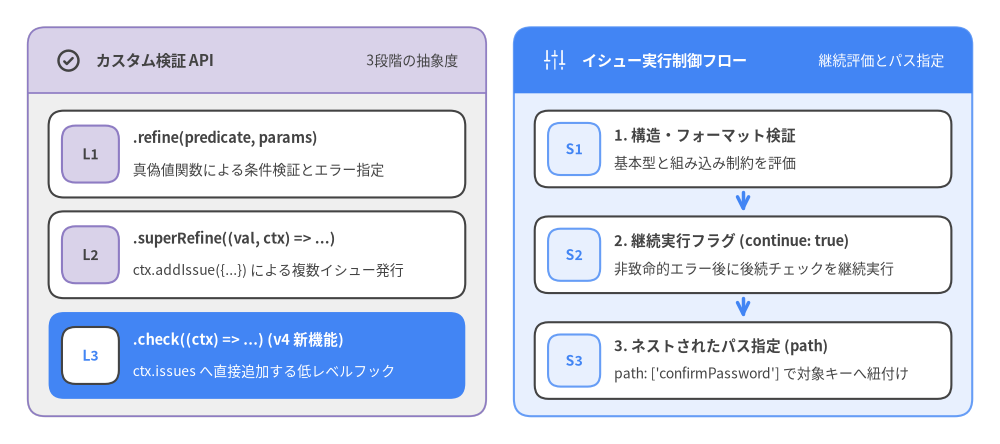
組み込みのフォーマットチェックだけでは表現できないビジネスルール(複数フィールド間の相関チェック、チェックサム計算、非同期のデータベース重複確認など)のために、Zod v4は3段階のカスタム検証APIを提供しています。
Source Code
from drawlib.canvas import save, setup
from drawlib.icons import phosphor
from drawlib.smartarts import CardList, Panel
from drawlib.styles import Styles

setup(width=144, height=64)

left_panel = Panel(
    "カスタム検証 API",
    "3段階の抽象度",
    style=Styles.Neutral,
    header_style=Styles.SecondaryNeutral.patch(shape_line_width=1.2),
    text_style=Styles.DarkBold.patch(text_size=11.0),
    description_style=Styles.Dark.patch(text_size=10.0),
    icon=phosphor.check_circle,
    icon_style=Styles.DarkBold,
    header_variant="filled",
    header_height=9.5,
)
left_panel.draw((4.0, 4.0), width=66.0, height=56.0, align="bottom_left")
l_xy, l_w, l_h = left_panel.get_content_box(
    (4.0, 4.0), width=66.0, height=56.0, padding=(3.0, 2.5), align="bottom_left"
)

val_cards = CardList(
    style=Styles.White,
    text_style=Styles.DarkBold.patch(text_size=10.5),
    description_style=Styles.Dark.patch(text_size=10.0),
    badge_style=Styles.SecondaryNeutral,
    badge_text_style=Styles.DarkBold.patch(text_size=10.0),
    spacing=2.0,
)
val_cards.add(
    ".refine(predicate, params)",
    "真偽値関数による条件検証とエラー指定",
    badge_text="L1",
)
val_cards.add(
    ".superRefine((val, ctx) => ...)",
    "ctx.addIssue({...}) による複数イシュー発行",
    badge_text="L2",
)
val_cards.add(
    ".check((ctx) => ...) (v4 新機能)",
    "ctx.issues へ直接追加する低レベルフック",
    badge_text="L3",
    style=Styles.PrimaryFlat,
    text_style=Styles.WhiteBold.patch(text_size=10.5),
    description_style=Styles.White.patch(text_size=10.0),
    badge_style=Styles.White,
    badge_text_style=Styles.PrimaryBold.patch(text_size=10.0),
)
val_cards.draw(l_xy, width=l_w, height=l_h)

right_panel = Panel(
    "イシュー実行制御フロー",
    "継続評価とパス指定",
    style=Styles.PrimaryNeutral,
    header_style=Styles.PrimaryFlat,
    text_style=Styles.WhiteBold.patch(text_size=11.0),
    description_style=Styles.White.patch(text_size=10.0),
    icon=phosphor.faders,
    icon_style=Styles.White,
    header_variant="filled",
    header_height=9.5,
)
right_panel.draw((74.0, 4.0), width=66.0, height=56.0, align="bottom_left")
r_xy, r_w, r_h = right_panel.get_content_box(
    (74.0, 4.0), width=66.0, height=56.0, padding=(3.0, 2.5), align="bottom_left"
)

flow_cards = CardList(
    style=Styles.White,
    text_style=Styles.DarkBold.patch(text_size=10.5),
    description_style=Styles.Dark.patch(text_size=10.0),
    badge_style=Styles.PrimaryNeutral,
    badge_text_style=Styles.PrimaryBold.patch(text_size=10.0),
    spacing=2.2,
    show_arrows=True,
    arrow_style=Styles.PrimaryBold,
)
flow_cards.add(
    "1. 構造・フォーマット検証",
    "基本型と組み込み制約を評価",
    badge_text="S1",
)
flow_cards.add(
    "2. 継続実行フラグ (continue: true)",
    "非致命的エラー後に後続チェックを継続実行",
    badge_text="S2",
)
flow_cards.add(
    "3. ネストされたパス指定 (path)",
    "path: ['confirmPassword'] で対象キーへ紐付け",
    badge_text="S3",
)
flow_cards.draw(r_xy, width=r_w, height=r_h)

save()
1. .refine() による条件述語チェック
.refine(predicate, params) は同期または async の真偽値関数 (val) => boolean を受け取ります。関数がfalsyな値を返すと、custom 検証イシューが発行されます。また、述語関数がTypeScriptの型ガード (val): val is SubType => ... になっている場合、Zodはスキーマの出力型を自動的に絞り込みます。
import { z } from "zod";

// シンプルな述語関数とエラーメッセージ文字列
const EvenInt = z.int().refine((n) => n % 2 === 0, "偶数である必要があります");

// 複数フィールド間の相関チェック(`path` と `error` の指定)
const PasswordSignupSchema = z
  .object({
    email: z.email(),
    password: z.string().min(12),
    confirmPassword: z.string(),
  })
  .refine((data) => data.password === data.confirmPassword, {
    error: "確認用パスワードが一致しません",
    path: ["confirmPassword"],
  });
2. .superRefine() による複数イシューの発行
1回の検証パスの中で、条件に応じて複数の異なるイシューや異なるフィールドパスへのエラーを発行したい場合は .superRefine((val, ctx) => ...) を使用します。
const TimeRangeSchema = z
  .object({
    startDate: z.iso.date(),
    endDate: z.iso.date(),
    maxSpanDays: z.int().positive(),
  })
  .superRefine((val, ctx) => {
    const startMs = Date.parse(val.startDate);
    const endMs = Date.parse(val.endDate);

    if (endMs < startMs) {
      ctx.addIssue({
        code: "custom",
        message: "終了日は開始日以降である必要があります",
        path: ["endDate"],
      });
      return;
    }

    const spanDays = (endMs - startMs) / (1000 * 60 * 60 * 24);
    if (spanDays > val.maxSpanDays) {
      ctx.addIssue({
        code: "custom",
        message: `期間 (${spanDays}日) が上限 (${val.maxSpanDays}日) を超えています`,
        path: ["endDate"],
      });
    }
  });
3. 低レベルフック .check()(Zod v4 新機能)
Zod v4の内部では、すべてのバリデーション制約が .check() によって実装されています。.check((ctx) => ...) に直接関数を渡すことで、ctx.value を検査し、continue: true(エラー後も後続のチェックを継続実行するフラグ)を含めて ctx.issues 配列へ直接イシューオブジェクトを追加できます。
const StrictSlug = z.string().check((ctx) => {
  if (ctx.value.startsWith("-") || ctx.value.endsWith("-")) {
    ctx.issues.push({
      code: "custom",
      input: ctx.value,
      message: "スラッグの先頭または末尾にハイフンは使用できません",
      continue: true, // 後続のチェックも引き続き実行する
    });
  }
  if (ctx.value.includes("--")) {
    ctx.issues.push({
      code: "custom",
      input: ctx.value,
      message: "連続するハイフンは使用できません",
    });
  }
});
5.2 .overwrite() による型保持ミューテーション(Zod v4 新機能)
Zod v3では、.transform() を呼び出すと常に ZodEffects ラッパー型に変化してしまい、元のスキーマが持っていた .min() や .max() などのメソッドを後からチェーンできなくなる課題がありました。
Zod v4では、型を変えないインプレース変換((x: Output) => Output)のために .overwrite(fn) が導入されました。.overwrite() はラッパー型ではなくチェックの一種として実装されているため:
- 元のスキーマクラス(
this)をそのまま返すので、.overwrite()の後ろに.min()、.max()、オブジェクト操作メソッドを自在にチェーンできます。 - 実際にZod v4の組み込み文字列正規化メソッド(
z.string().trim()、.toLowerCase()、.toUpperCase()、.normalize())はすべて内部で.overwrite()によって実装されています。
// `ZodString` の型とメソッドを維持したまま、空白除去と先頭の '@' 除去を実行!
const HandleSchema = z
  .string()
  .trim()
  .overwrite((s) => (s.startsWith("@") ? s.slice(1) : s))
  .toLowerCase()
  .min(3)
  .max(20);

HandleSchema.parse("  @Alice_Dev  "); // => "alice_dev"
5.3 単方向変換とパイプライン(.transform(), .pipe())
実行時の型そのものを別の型へ変換する場合(例:string から number[] やドメインオブジェクトへの変換)は、.transform() と .pipe() を組み合わせてパイプラインを構築します。
// 1. `.transform()` で Output<A> を新しい型へ変換
const CsvTokens = z
  .string()
  .trim()
  .transform((raw) => (raw === "" ? [] : raw.split(",").map((s) => Number(s.trim()))));
// 入力型 (Input): string
// 出力型 (Output): number[]

// 2. `.pipe()` で前のスキーマの出力を次のスキーマの入力へ連結して検証
const CommaSeparatedInts = CsvTokens.pipe(z.array(z.int().positive()).nonempty());

type CommaSeparatedIntsIn = z.input<typeof CommaSeparatedInts>;   // string
type CommaSeparatedIntsOut = z.output<typeof CommaSeparatedInts>; // number[]

CommaSeparatedInts.parse("101, 202, 303"); // => [101, 202, 303]
重要: 単方向の
.transform()は順方向(input -> output)の変換関数しか持たないため、.transform()を含むスキーマに対して逆方向のz.encode()を呼び出すと実行時エラーがスローされます。双方向のシリアライズが必要な場合は、必ず次に説明するz.codec()を使用してください。
5.4 双方向Codec(z.codec, z.decode, z.encode)
Zod v4の最も重要な新機能の1つが z.codec(inputSchema, outputSchema, { decode, encode }) です。Codecは入力スキーマ(JSON文字列やISO 8601文字列などの通信・保存用ワイヤフォーマット)と出力スキーマ(Date インスタンスや型付きオブジェクトなどのアプリケーション内部ドメイン型)を対にし、順方向の decode 関数と逆方向の encode 関数を一元管理します。
順方向デコード(Decode)と逆方向エンコード(Encode)
| 操作 | 例外スロー関数 | Safe結果関数 | 方向と型シグネチャ |
|---|---|---|---|
| 順方向 (Decode) | z.decode(schema, input) (または schema.decode(input)) |
z.safeDecode(schema, input) |
z.input<S> -> z.output<S>(In を検証 -> decode 実行 -> Out を検証) |
| 逆方向 (Encode) | z.encode(schema, output) (または schema.encode(output)) |
z.safeEncode(schema, output) |
z.output<S> -> z.input<S>(Out を検証 -> encode 実行 -> In を検証) |
| 未検証入力 (Parse) | z.parse(schema, unknownVal) |
z.safeParse(schema, unknownVal) |
unknown -> z.output<S>(実行経路は decode と同一、引数型が unknown) |
非同期サポート: 非同期の
decode/encode関数もz.decodeAsync()、z.encodeAsync()、z.safeDecodeAsync()、z.safeEncodeAsync()で完全にサポートされています。
例1:ISO 8601 日時文字列 <-> JavaScript Date
import { z } from "zod";

const IsoDateCodec = z.codec(
  z.iso.datetime(), // ワイヤ形式: ISO 8601 文字列 ("2026-11-10T10:30:00Z")
  z.date(),         // ドメイン形式: JavaScript Date インスタンス
  {
    decode: (isoString) => new Date(isoString),
    encode: (dateObj) => dateObj.toISOString(),
  }
);

type WireFormat = z.input<typeof IsoDateCodec>;    // string
type DomainFormat = z.output<typeof IsoDateCodec>; // Date

// 1. ワイヤ文字列 -> Date インスタンスへデコード
const parsedDate = z.decode(IsoDateCodec, "2026-11-10T10:30:00.000Z");
// => Date(2026-11-10T10:30:00.000Z)

// 2. Date インスタンス -> ISO 8601 文字列へエンコード
const serializedIso = z.encode(IsoDateCodec, parsedDate);
// => "2026-11-10T10:30:00.000Z"
例2:汎用 JSON 文字列 <-> 型付きオブジェクト Codec
任意のZodスキーマを受け取る高階関数 jsonCodec(schema) を定義しておくと、JSON文字列のパースとスキーマ検証、およびオブジェクトからのJSON文字列化を双方向に安全に実行できます(不正なJSON構文も payload.issues.push(...) でZodのエラーとして扱えます)。
function jsonCodec<T extends z.ZodType>(targetSchema: T) {
  return z.codec(z.string(), targetSchema, {
    decode: (jsonStr, payload) => {
      try {
        return JSON.parse(jsonStr);
      } catch (err) {
        payload.issues.push({
          code: "custom",
          input: jsonStr,
          message: err instanceof Error ? err.message : "Invalid JSON string",
        });
        return z.NEVER;
      }
    },
    encode: (value) => JSON.stringify(value),
  });
}

// Codec は大規模なオブジェクトスキーマの内部に直接ネスト可能!
const WebhookRowSchema = z.object({
  id: z.uuid(),
  createdAt: IsoDateCodec,
  payload: jsonCodec(
    z.object({
      event: z.enum(["user.created", "user.deleted"]),
      userId: z.int().positive(),
    })
  ),
});

// データベースやキューのレコード全体を1回の呼び出しでデコード:
const domainRow = z.decode(WebhookRowSchema, {
  id: "550e8400-e29b-41d4-a716-446655440000",
  createdAt: "2026-11-10T10:30:00.000Z",
  payload: '{"event":"user.created","userId":42}',
});
// domainRow.createdAt は `Date` インスタンス
// domainRow.payload は `{ event: "user.created", userId: 42 }`

// ドメインオブジェクトをそのままワイヤ形式へ逆エンコード:
const wireRow = z.encode(WebhookRowSchema, domainRow);
// wireRow.createdAt === "2026-11-10T10:30:00.000Z"
// wireRow.payload === '{"event":"user.created","userId":42}'
例3:URLSearchParams <-> 型付きクエリフィルタオブジェクト
const PaginationQueryCodec = z.codec(
  z.instanceof(URLSearchParams),
  z.object({
    page: z.int().min(1),
    limit: z.int().min(1).max(100),
    q: z.string().optional(),
  }),
  {
    decode: (params) => ({
      page: Number(params.get("page") ?? "1"),
      limit: Number(params.get("limit") ?? "20"),
      q: params.get("q") ?? undefined,
    }),
    encode: (query) => {
      const params = new URLSearchParams({
        page: String(query.page),
        limit: String(query.limit),
      });
      if (query.q !== undefined) params.set("q", query.q);
      return params;
    },
  }
);

const filters = z.decode(PaginationQueryCodec, new URLSearchParams("page=2&limit=50&q=zod"));
// => { page: 2, limit: 50, q: "zod" }

const searchParams = z.encode(PaginationQueryCodec, filters);
// => URLSearchParams { "page" => "2", "limit" => "50", "q" => "zod" }
組み込み z.stringbool() Codec と z.invertCodec()
z.stringbool(): 環境変数などの文字列表現("true","1","yes","on","y","enabled"->true、および"false","0","no","off","n","disabled"->false)とbooleanを双方向変換する組み込みのZodCodec<ZodString, ZodBoolean>です。z.invertCodec(codec): 既存のZodCodec<In, Out>の入力・出力スキーマおよびdecode/encode関数を入れ替えた逆方向CodecZodCodec<Out, In>を生成します。
続いて 6. エラー整形と49言語i18nロケール に進み、Zod v4で刷新されたエラー整形ユーティリティ(z.prettifyError、z.treeifyError、z.flattenError)と49言語の国際化ロケールシステムを学びましょう。