4. ユニオン・判別共用体・インターセクション
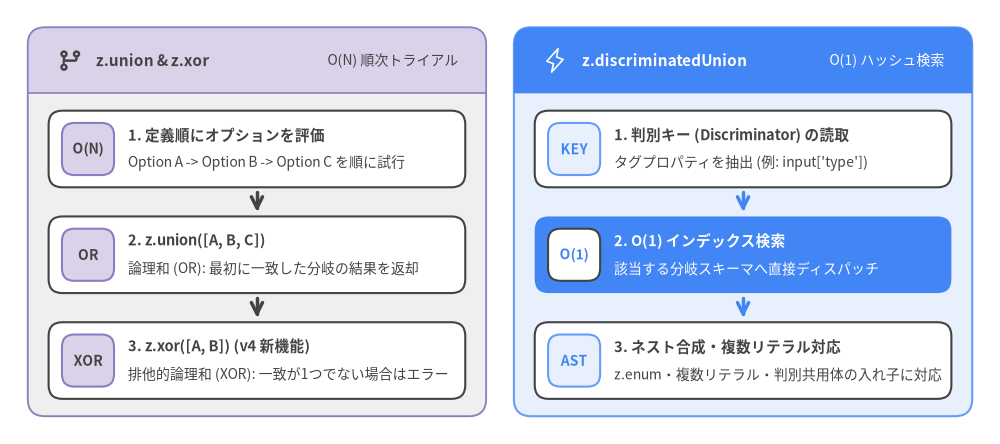
現代のAPIでは、イベント種別ごとに異なる構造を持つWebhookペイロードや、排他的な認証情報(APIキーまたはOAuthトークン)、あるいはオプショナル・null許容・フォールバック規定値を持つ設定フィールドなど、多態的(ポリモーフィック)なデータの検証が頻繁に求められます。Zod v4は、代数的データ型コンビネータ(z.union、z.discriminatedUnion、z.xor、z.intersection)と、柔軟なラッパーモディファイア(.optional()、.nullable()、.default()、.prefault()、.catch()、.readonly()、.brand())を提供します。
Source Code
from drawlib.canvas import save, setup
from drawlib.icons import phosphor
from drawlib.smartarts import CardList, Panel
from drawlib.styles import Styles

setup(width=144, height=64)

left_panel = Panel(
    "z.union & z.xor",
    "O(N) 順次トライアル",
    style=Styles.Neutral,
    header_style=Styles.SecondaryNeutral.patch(shape_line_width=1.2),
    text_style=Styles.DarkBold.patch(text_size=11.0),
    description_style=Styles.Dark.patch(text_size=10.0),
    icon=phosphor.git_branch,
    icon_style=Styles.DarkBold,
    header_variant="filled",
    header_height=9.5,
)
left_panel.draw((4.0, 4.0), width=66.0, height=56.0, align="bottom_left")
l_xy, l_w, l_h = left_panel.get_content_box(
    (4.0, 4.0), width=66.0, height=56.0, padding=(3.0, 2.5), align="bottom_left"
)

seq_cards = CardList(
    style=Styles.White,
    text_style=Styles.DarkBold.patch(text_size=10.5),
    description_style=Styles.Dark.patch(text_size=10.0),
    badge_style=Styles.SecondaryNeutral,
    badge_text_style=Styles.DarkBold.patch(text_size=10.0),
    spacing=2.2,
    show_arrows=True,
    arrow_style=Styles.DarkBold,
)
seq_cards.add(
    "1. 定義順にオプションを評価",
    "Option A -> Option B -> Option C を順に試行",
    badge_text="O(N)",
)
seq_cards.add(
    "2. z.union([A, B, C])",
    "論理和 (OR): 最初に一致した分岐の結果を返却",
    badge_text="OR",
)
seq_cards.add(
    "3. z.xor([A, B]) (v4 新機能)",
    "排他的論理和 (XOR): 一致が1つでない場合はエラー",
    badge_text="XOR",
)
seq_cards.draw(l_xy, width=l_w, height=l_h)

right_panel = Panel(
    "z.discriminatedUnion",
    "O(1) ハッシュ検索",
    style=Styles.PrimaryNeutral,
    header_style=Styles.PrimaryFlat,
    text_style=Styles.WhiteBold.patch(text_size=11.0),
    description_style=Styles.White.patch(text_size=10.0),
    icon=phosphor.lightning,
    icon_style=Styles.White,
    header_variant="filled",
    header_height=9.5,
)
right_panel.draw((74.0, 4.0), width=66.0, height=56.0, align="bottom_left")
r_xy, r_w, r_h = right_panel.get_content_box(
    (74.0, 4.0), width=66.0, height=56.0, padding=(3.0, 2.5), align="bottom_left"
)

disc_cards = CardList(
    style=Styles.White,
    text_style=Styles.DarkBold.patch(text_size=10.5),
    description_style=Styles.Dark.patch(text_size=10.0),
    badge_style=Styles.PrimaryNeutral,
    badge_text_style=Styles.PrimaryBold.patch(text_size=10.0),
    spacing=2.2,
    show_arrows=True,
    arrow_style=Styles.PrimaryBold,
)
disc_cards.add(
    "1. 判別キー (Discriminator) の読取",
    "タグプロパティを抽出 (例: input['type'])",
    badge_text="KEY",
)
disc_cards.add(
    "2. O(1) インデックス検索",
    "該当する分岐スキーマへ直接ディスパッチ",
    badge_text="O(1)",
    style=Styles.PrimaryFlat,
    text_style=Styles.WhiteBold.patch(text_size=10.5),
    description_style=Styles.White.patch(text_size=10.0),
    badge_style=Styles.White,
    badge_text_style=Styles.PrimaryBold.patch(text_size=10.0),
)
disc_cards.add(
    "3. ネスト合成・複数リテラル対応",
    "z.enum・複数リテラル・判別共用体の入れ子に対応",
    badge_text="AST",
)
disc_cards.draw(r_xy, width=r_w, height=r_h)

save()
4.1 標準ユニオン(z.union と .or())
z.union([A, B, ...])(またはメソッドチェーンの .or())は、包括的な論理和(A | B)を表します。実行時には配列の宣言順にメンバースキーマを1つずつ検証し、最初に成功したスキーマのパース結果を返します。
import { z } from "zod";

const StringOrNumber = z.union([z.string(), z.number()]);
// メソッドチェーンによる同等の記法:
const FluentStringOrNumber = z.string().or(z.number());

type StringOrNumber = z.infer<typeof StringOrNumber>; // string | number

StringOrNumber.parse("hello"); // => "hello"
StringOrNumber.parse(42);      // => 42
順序に関するヒント:
z.union()は最初に一致した分岐で短絡評価(ショートサーキット)するため、分岐の条件が重複する場合は、より具体的なスキーマを汎用的なスキーマ(.transform()や.looseObject()を含むものなど)より前に配置してください。
4.2 判別共用体(z.discriminatedUnion)
ユニオンの各メンバーが共通のリテラルまたはEnumプロパティ(type、kind、status などの判別キー / Discriminator)を持つオブジェクトである場合は、z.union(options) ではなく常に z.discriminatedUnion(discriminator, options) を使用してください。
すべての分岐を $O(N)$ 時間で順次試行する代わりに、z.discriminatedUnion() はスキーマ構築時に判別キーの値で全分岐のインデックスマップを作成し、パース時に $O(1)$ のマップ検索で対象スキーマへ直接ディスパッチします。さらに、エラー発生時にも全分岐の汎用的な invalid_union ではなく、一致した分岐に絞った的確なエラーメッセージを生成します。
const PaymentEvent = z.discriminatedUnion("type", [
  z.object({
    type: z.literal("charge.succeeded"),
    chargeId: z.uuid(),
    amountCents: z.int().positive(),
  }),
  z.object({
    type: z.literal("charge.failed"),
    chargeId: z.uuid(),
    reasonCode: z.enum(["insufficient_funds", "card_declined", "expired_card"]),
  }),
  z.object({
    type: z.literal("refund.issued"),
    refundId: z.uuid(),
    chargeId: z.uuid(),
  }),
]);

type PaymentEvent = z.infer<typeof PaymentEvent>;
Zod v4 の強化点:複数リテラルタグと判別共用体のネスト合成
Zod v4では z.discriminatedUnion() が大幅に強化されました。
- 複数値を持つ判別キー: 1つの分岐の判別キーに複数値リテラル
z.literal(["http", "https"])やz.enum(["created", "updated"])を指定できます。 - 判別共用体の入れ子(ネスト合成): 既存の
z.discriminatedUnion()を、同じ判別キーを持つ別のz.discriminatedUnion()のオプション配列に直接渡して合成できます。
const ReadEvent = z.discriminatedUnion("op", [
  z.object({ op: z.literal("get"), key: z.string() }),
  z.object({ op: z.literal("scan"), prefix: z.string() }),
]);

const WriteEvent = z.discriminatedUnion("op", [
  z.object({ op: z.literal(["put", "upsert"]), key: z.string(), value: z.unknown() }),
  z.object({ op: z.literal("delete"), key: z.string() }),
]);

// 2つの判別共用体を統合し、単一の O(1) ディスパッチャとして合成
const StorageEvent = z.discriminatedUnion("op", [ReadEvent, WriteEvent]);
4.3 排他的ユニオン(z.xor)
標準の z.union() は包括的論理和(OR)であるため、入力データが複数の分岐を同時に満たす場合でも最初の分岐で成功します。一方、互いに排他的な認証設定やJSON Schemaの oneOf 制約など、ちょうど1つの分岐のみに一致しなければならないケースでは、Zod v4で新設された z.xor(options) を使用します。
// APIキー または OAuth Bearerトークンのいずれか一方のみを許可(同時指定は不可)
const AuthConfig = z.xor([
  z.object({ apiKey: z.string().min(32) }),
  z.object({ bearerToken: z.jwt() }),
]);

// 1. ちょうど1つの分岐に一致 -> 成功!
AuthConfig.parse({ apiKey: "zod_key_0123456789abcdef0123456789abcdef" });

// 2. 両方の分岐に一致(デフォルトの z.object は未知キーを除去するため両方成功する)-> エラー!
const ambiguous = AuthConfig.safeParse({
  apiKey: "zod_key_0123456789abcdef0123456789abcdef",
  bearerToken: "eyJhbGciOiJIUzI1NiIsInR5cCI6IkpXVCJ9.e30.SflKxwRJSMeKKF2QT4fwpMeJf36POk6yJV_adQssw5c",
});
// ambiguous.success === false (排他的ユニオン違反)
4.4 インターセクション(z.intersection と .and())
z.intersection(A, B)(または A.and(B))は論理積(A & B)を表し、入力データが両方のスキーマを満たすことを要求してパース結果をマージします。
const Timestamped = z.object({
  createdAt: z.iso.datetime(),
  updatedAt: z.iso.datetime(),
});

const SoftDeletable = z.object({
  deletedAt: z.iso.datetime().nullable(),
});

const AuditMetadata = z.intersection(Timestamped, SoftDeletable);
// メソッドチェーンによる同等の記法: Timestamped.and(SoftDeletable)
ベストプラクティス: 通常の
ZodObject同士を結合する場合は、z.intersection()よりもTimestamped.extend(SoftDeletable.shape)を推奨します。.extend()は.pick()、.omit()、.partial()、.keyof()などのメソッドを引き続き利用できるフラットなZodObjectを生成します。z.intersection()はユニオンやレコード、リファインメント付きスキーマの交差型を作る場合に活用してください。
4.5 Optional・Nullable・Default・Prefault コンビネータ
Source Code
from drawlib.canvas import save, setup
from drawlib.icons import phosphor
from drawlib.smartarts import CardList, Panel, Table
from drawlib.styles import Styles

setup(width=144, height=64)

left_panel = Panel(
    ".default() vs .prefault()",
    "undefined 時の評価順序",
    style=Styles.PrimaryNeutral,
    header_style=Styles.PrimaryFlat,
    text_style=Styles.WhiteBold.patch(text_size=11.0),
    description_style=Styles.White.patch(text_size=10.0),
    icon=phosphor.funnel,
    icon_style=Styles.White,
    header_variant="filled",
    header_height=9.5,
)
left_panel.draw((4.0, 4.0), width=66.0, height=56.0, align="bottom_left")
l_xy, l_w, l_h = left_panel.get_content_box(
    (4.0, 4.0), width=66.0, height=56.0, padding=(3.0, 2.5), align="bottom_left"
)

def_cards = CardList(
    style=Styles.White,
    text_style=Styles.DarkBold.patch(text_size=10.5),
    description_style=Styles.Dark.patch(text_size=10.0),
    badge_style=Styles.SecondaryNeutral,
    badge_text_style=Styles.DarkBold.patch(text_size=10.0),
    spacing=2.0,
)
def_cards.add(
    ".default(outputValue)",
    "内部パースをスキップし出力規定値を返却",
    badge_text="OUT",
)
def_cards.add(
    ".prefault(inputValue) (v4 新機能)",
    "入力規定値を内部パース・変換へ供給",
    badge_text="IN",
    style=Styles.PrimaryFlat,
    text_style=Styles.WhiteBold.patch(text_size=10.5),
    description_style=Styles.White.patch(text_size=10.0),
    badge_style=Styles.White,
    badge_text_style=Styles.PrimaryBold.patch(text_size=10.0),
)
def_cards.add(
    ".catch(fallbackOrFn)",
    "検証エラーを捕捉しフォールバック値を返却",
    badge_text="ERR",
)
def_cards.draw(l_xy, width=l_w, height=l_h)

right_panel = Panel(
    "ラッパーコンビネータ",
    "型と実行時の修飾",
    style=Styles.Neutral,
    header_style=Styles.SecondaryNeutral.patch(shape_line_width=1.2),
    text_style=Styles.DarkBold.patch(text_size=11.0),
    description_style=Styles.Dark.patch(text_size=10.0),
    icon=phosphor.shield_check,
    icon_style=Styles.DarkBold,
    header_variant="filled",
    header_height=9.5,
)
right_panel.draw((74.0, 4.0), width=66.0, height=56.0, align="bottom_left")
r_xy, r_w, r_h = right_panel.get_content_box(
    (74.0, 4.0), width=66.0, height=56.0, padding=(3.0, 2.5), align="bottom_left"
)

wrap_table = Table(
    cell_style=Styles.White,
    text_style=Styles.Dark.patch(text_size=10.0),
    header_cell_style=Styles.PrimaryFlat,
    header_text_style=Styles.WhiteBold.patch(text_size=10.0),
    border_style=Styles.MutedThin,
)
wrap_table.draw(
    xy=r_xy,
    width=r_w,
    height=r_h,
    align="bottom_left",
    data=[
        ["ラッパーメソッド", "推論される出力型"],
        [".optional()", "T | undefined"],
        [".nullable()", "T | null"],
        [".nullish()", "T | null | undefined"],
        [".readonly()", "Readonly<T> (Object.freeze)"],
        [".brand<'Tag'>()", "T & z.$brand<'Tag'>"],
    ],
)

save()
.optional()、.nullable()、.nullish()、.nonoptional()
const BioSchema = z.string().optional();   // string | undefined
const PhoneSchema = z.string().nullable(); // string | null
const NickSchema = z.string().nullish();   // string | null | undefined

// `.unwrap()` でいつでも内部スキーマを取り出し可能:
BioSchema.unwrap(); // ZodString

// オプショナルなスキーマから `undefined` を除外して必須化:
const RequiredBio = BioSchema.nonoptional(); // string
.default() と .prefault() の違い(Zod v4 の重要ポイント)
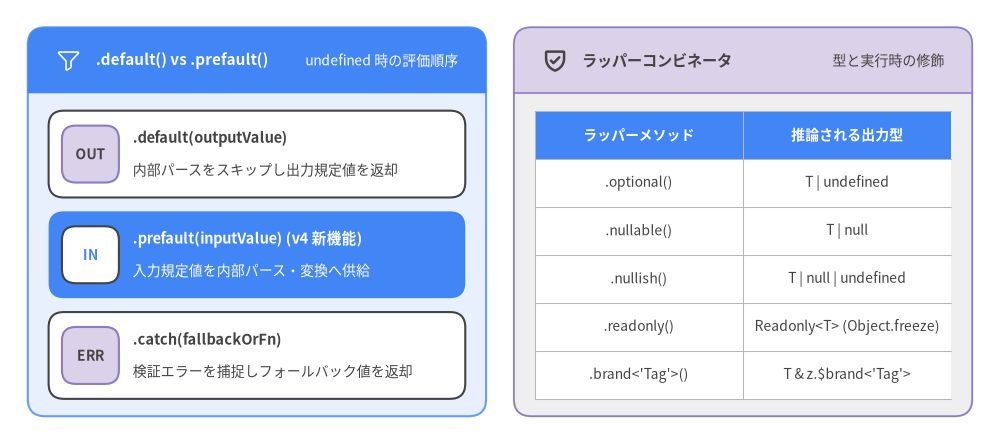
Zod v4では、入力が undefined の場合のデフォルト値処理として .default() と .prefault() の2種類が明確に区別されています。
.default(outputValue)— 短絡評価される出力デフォルト値: 入力がundefinedの場合、Zodは**内部スキーマの検証や.transform()をスキップ(短絡評価)し、指定されたoutputValueをそのまま返します。したがって.default()の引数はスキーマの出力型(z.output<T>)**に一致する必要があります。.prefault(inputValue)— パース前に入力されるデフォルト値: 入力がundefinedの場合、ZodはinputValueを代替入力としてセットし、内部スキーマの検証および変換パイプライン全体を実行します。したがって.prefault()の引数はスキーマの**入力型(z.input<T>)**に一致します。
// 文字列をトリムしてその文字数(number)に変換するパイプライン
const TrimmedLength = z
  .string()
  .trim()
  .transform((val) => val.length);
// 入力型 (Input): string | undefined
// 出力型 (Output): number

// 1. `.default()` は出力型 (`number`) を受け取り、変換をスキップして即座に返す:
const WithDefault = TrimmedLength.default(0);
WithDefault.parse(undefined); // => 0 (transform は実行されない)

// 2. `.prefault()` は入力型 (`string`) を受け取り、パイプラインを実行する:
const WithPrefault = TrimmedLength.prefault("  hello  ");
WithPrefault.parse(undefined); // => 5 ("  hello  " -> "hello" にトリム -> 長さ 5)
動的デフォルト値:
.default(() => ...)と.prefault(() => ...)はどちらもファクトリ関数(例:.default(() => new Date())や.default(() => crypto.randomUUID()))を受け取ることができ、undefinedが渡されるたびに新しい値を生成します。
.catch() によるエラーフォールバック
.default() が undefined のみを対象とするのに対し、.catch(fallbackValueOrFn) は内部スキーマで発生したあらゆる検証エラーを捕捉し、安全なフォールバック出力値を返します。コールバック関数 (ctx) => ... を渡すと、ctx.error や ctx.input を参照してログ出力や分岐処理を行えます。
const SafePort = z.int().min(1).max(65535).catch(8080);

SafePort.parse(3000);      // => 3000
SafePort.parse(99999);     // => 8080 (範囲外エラーから回復)
SafePort.parse("invalid"); // => 8080 (型エラーから回復)

// `.catch()` コールバック内で検証エラーの詳細を参照:
const TrackedRole = z.enum(["admin", "user"]).catch((ctx) => {
  console.warn(`Invalid role "${String(ctx.input)}", falling back to "user"`, ctx.error.issues);
  return "user";
});
4.6 イミュータビリティと公称型ブランディング(.readonly(), .brand())
.readonly() による静的・実行時イミュータビリティ
オブジェクト、配列、タプル、Map、Set スキーマに対して .readonly() を呼び出すと、TypeScriptの推論型が Readonly<T>(または ReadonlyArray<T> など)になるだけでなく、実行時にもパース結果に対して Object.freeze() が適用されます。
const FrozenConfig = z
  .object({
    host: z.string(),
    port: z.int(),
  })
  .readonly();

type FrozenConfig = z.infer<typeof FrozenConfig>;
// Readonly<{ host: string; port: number }>

const cfg = FrozenConfig.parse({ host: "localhost", port: 5432 });
Object.isFrozen(cfg); // => true
.brand() による公称型(Nominal Typing)の付与
TypeScriptの型システムは構造的(Structural)であるため、同じ string 型である userId と organizationId を誤って取り違えてもコンパイルエラーになりません。.brand<"Tag">() を使用すると、実行時のオーバーヘッドゼロでコンパイル時の公称ブランドシンボル(z.$brand<"Tag">)を付与できます。
const UserId = z.uuid().brand<"UserId">();
const OrgId = z.uuid().brand<"OrgId">();

type UserId = z.infer<typeof UserId>; // string & z.$brand<"UserId">
type OrgId = z.infer<typeof OrgId>;   // string & z.$brand<"OrgId">

function fetchUserProfile(id: UserId) {
  return id;
}

const uid = UserId.parse("550e8400-e29b-41d4-a716-446655440000");
const oid = OrgId.parse("6ba7b810-9dad-11d1-80b4-00c04fd430c8");

fetchUserProfile(uid); // OK!
// fetchUserProfile(oid); // TypeScript コンパイルエラー: OrgId は UserId に代入不可
// fetchUserProfile("550e8400-..."); // TypeScript コンパイルエラー: 生の string は代入不可
Note: Zod v4の
.brand<"Tag", "in" | "out" | "inout">()では第2型引数によって、ブランド型を出力型z.output<T>(デフォルトの"out")、入力型z.input<T>("in")、またはその両方("inout")のどこに付与するかを制御できます。
続いて 5. リファインメント・パイプライン・双方向Codec に進み、カスタム検証ルール(.refine()、.superRefine()、.check())、型を保持するインプレース変換(.overwrite())、そしてZod v4の目玉機能である双方向変換 z.codec() を詳しく見ていきましょう。