3. オブジェクト・コレクション・再帰スキーマ
実際のTypeScriptアプリケーションでは、単一のプリミティブ値だけを検証することは稀です。REST APIのエンドポイント、GraphQLリゾルバ、設定ファイル、メッセージキューから届くペイロードは、ネストされたオブジェクト、配列、タプル、キー・バリュー辞書、そして再帰的なツリー構造で構成されています。Zod v4は、未知キーの扱いを明示する3つのオブジェクトコンストラクタ(z.object、z.strictObject、z.looseObject)、z.lazy()のボイラープレートを不要にするネイティブESゲッター再帰、そして豊富なコレクションスキーマを提供します。
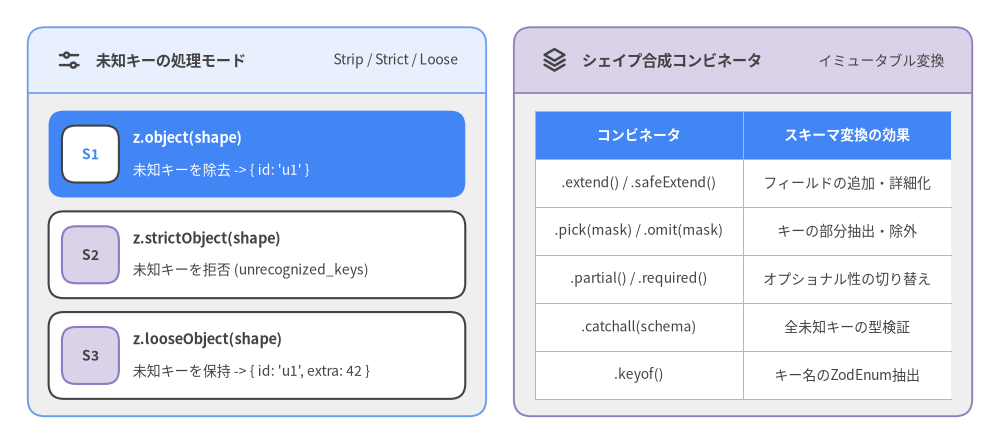
Source Code
from drawlib.canvas import save, setup
from drawlib.icons import phosphor
from drawlib.smartarts import CardList, Panel, Table
from drawlib.styles import Styles

setup(width=144, height=64)

left_panel = Panel(
    "未知キーの処理モード",
    "Strip / Strict / Loose",
    style=Styles.Neutral,
    header_style=Styles.PrimaryNeutral.patch(shape_line_width=1.2),
    text_style=Styles.DarkBold.patch(text_size=11.0),
    description_style=Styles.Dark.patch(text_size=10.0),
    icon=phosphor.sliders_horizontal,
    icon_style=Styles.DarkBold,
    header_variant="filled",
    header_height=9.5,
)
left_panel.draw((4.0, 4.0), width=66.0, height=56.0, align="bottom_left")
l_xy, l_w, l_h = left_panel.get_content_box(
    (4.0, 4.0), width=66.0, height=56.0, padding=(3.0, 2.5), align="bottom_left"
)

modes = CardList(
    style=Styles.White,
    text_style=Styles.DarkBold.patch(text_size=10.5),
    description_style=Styles.Dark.patch(text_size=10.0),
    badge_style=Styles.SecondaryNeutral,
    badge_text_style=Styles.DarkBold.patch(text_size=10.0),
    spacing=2.0,
)
modes.add(
    "z.object(shape)",
    "未知キーを除去 -> { id: 'u1' }",
    badge_text="S1",
    style=Styles.PrimaryFlat,
    text_style=Styles.WhiteBold.patch(text_size=10.5),
    description_style=Styles.White.patch(text_size=10.0),
    badge_style=Styles.White,
    badge_text_style=Styles.PrimaryBold.patch(text_size=10.0),
)
modes.add(
    "z.strictObject(shape)",
    "未知キーを拒否 (unrecognized_keys)",
    badge_text="S2",
)
modes.add(
    "z.looseObject(shape)",
    "未知キーを保持 -> { id: 'u1', extra: 42 }",
    badge_text="S3",
)
modes.draw(l_xy, width=l_w, height=l_h)

right_panel = Panel(
    "シェイプ合成コンビネータ",
    "イミュータブル変換",
    style=Styles.Neutral,
    header_style=Styles.SecondaryNeutral.patch(shape_line_width=1.2),
    text_style=Styles.DarkBold.patch(text_size=11.0),
    description_style=Styles.Dark.patch(text_size=10.0),
    icon=phosphor.stack,
    icon_style=Styles.DarkBold,
    header_variant="filled",
    header_height=9.5,
)
right_panel.draw((74.0, 4.0), width=66.0, height=56.0, align="bottom_left")
r_xy, r_w, r_h = right_panel.get_content_box(
    (74.0, 4.0), width=66.0, height=56.0, padding=(3.0, 2.5), align="bottom_left"
)

comb_table = Table(
    cell_style=Styles.White,
    text_style=Styles.Dark.patch(text_size=10.0),
    header_cell_style=Styles.PrimaryFlat,
    header_text_style=Styles.WhiteBold.patch(text_size=10.0),
    border_style=Styles.MutedThin,
)
comb_table.draw(
    xy=r_xy,
    width=r_w,
    height=r_h,
    align="bottom_left",
    data=[
        ["コンビネータ", "スキーマ変換の効果"],
        [".extend() / .safeExtend()", "フィールドの追加・詳細化"],
        [".pick(mask) / .omit(mask)", "キーの部分抽出・除外"],
        [".partial() / .required()", "オプショナル性の切り替え"],
        [".catchall(schema)", "全未知キーの型検証"],
        [".keyof()", "キー名のZodEnum抽出"],
    ],
)

save()
3.1 オブジェクトスキーマと未知キーの処理(z.object, z.strictObject, z.looseObject)
Zod v4では、shapeで宣言されていない未知のプロパティを実行時にどう扱うかに応じて、3つのトップレベルファクトリ関数が用意されています。
z.object(shape)(Stripモード — デフォルト): 宣言されたすべてのプロパティを検証し、未定義のキーはパース結果から自動的に除去(ストリップ)します。これにより、後続のアプリケーションロジックに検証済みのプロパティのみが渡ることが保証されます。z.strictObject(shape)(Strictモード):shapeに含まれないキーが1つでも存在する場合に入力を拒否し、予期しないプロパティ名のリストを含むunrecognized_keysイシューを発行します。z.looseObject(shape)(Passthroughモード): 宣言されたプロパティを検証しつつ、未知のキーもそのまま出力オブジェクトに保持します(TypeScriptの推論型にはインデックスシグネチャ[x: string]: unknownが付与されます)。
import { z } from "zod";

// 1. デフォルトのStripモード: z.object()
const UserSchema = z.object({
  id: z.uuid(),
  username: z.string().min(3),
  role: z.enum(["admin", "editor", "viewer"]),
});

const rawInput = {
  id: "550e8400-e29b-41d4-a716-446655440000",
  username: "alice",
  role: "admin",
  debugFlag: true, // 未知のキー
};

// `debugFlag` は出力から除去される
const stripped = UserSchema.parse(rawInput);
// => { id: "550e8400-...", username: "alice", role: "admin" }

// 2. Strictモード: z.strictObject()
const StrictUserSchema = z.strictObject({
  id: z.uuid(),
  username: z.string().min(3),
});

const strictResult = StrictUserSchema.safeParse({
  id: "550e8400-e29b-41d4-a716-446655440000",
  username: "alice",
  debugFlag: true,
});
// strictResult.success === false
// Issue code: "unrecognized_keys", keys: ["debugFlag"]

// 3. Loose(パススルー)モード: z.looseObject()
const LooseUserSchema = z.looseObject({
  id: z.uuid(),
  username: z.string().min(3),
});

const looseOutput = LooseUserSchema.parse(rawInput);
// => { id: "550e8400-...", username: "alice", role: "admin", debugFlag: true }
Note: 既存の
ZodObjectインスタンスに対しても、.strip()、.strict()、.loose()(またはエイリアスの.passthrough())を呼び出すことでモードを自在に切り替えられます。
.catchall() による追加キーの検証
固定の静的プロパティに加えて、動的な追加キーもすべて特定のスキーマで検証したい場合は.catchall(schema)を使用します。
const ServiceHeaders = z
  .object({
    "content-type": z.string(),
    "x-request-id": z.uuid(),
  })
  .catchall(z.string());

type ServiceHeaders = z.infer<typeof ServiceHeaders>;
// { "content-type": string; "x-request-id": string; [x: string]: string }
3.2 オブジェクトの合成とシェイプ操作
すべてのZodObjectインスタンスはイミュータブル(不変)です。合成メソッドを呼び出すと、更新されたTypeScriptの静的型と実行時検証定義を持つ新しいZodObjectが返されます。
.extend() と .safeExtend()
新しいプロパティの追加や既存プロパティの上書きには.extend(shape)を使用します。Zod v4では非推奨となった.merge()に代わり、TypeScriptコンパイラの型推論パフォーマンスに優れた.extend()が標準となります。また、既存のキーを互換性のない型で誤って上書きすることをコンパイル時に防ぎたい場合は.safeExtend(shape)を使用します。
const BaseEntity = z.object({
  id: z.uuid(),
  createdAt: z.iso.datetime(),
});

// 新規フィールドの追加または上書き
const ArticleSchema = BaseEntity.extend({
  title: z.string().min(1),
  tags: z.array(z.string()),
});

// 型安全な拡張: 新規キーの追加、または既存キーの型の絞り込み(narrowing)のみを許可
const AuditedArticleSchema = ArticleSchema.safeExtend({
  title: z.string().min(5).max(120), // `string` の有効な絞り込み
  updatedBy: z.string(),             // 新規キー
});
.pick() と .omit()
TypeScript標準のユーティリティ型Pick<T, K>およびOmit<T, K>と同様に、ブールマスク({ key: true })を指定してキーの部分集合を抽出・除外します。
const CreateArticleInput = ArticleSchema.omit({
  id: true,
  createdAt: true,
});
// 推論型: { title: string; tags: string[] }

const ArticleSummary = ArticleSchema.pick({
  id: true,
  title: true,
});
// 推論型: { id: string; title: string }
.partial()、.exactPartial()、.required()
.partial()はすべてのプロパティ(またはマスクで指定したプロパティのみ)をオプショナル(T | undefined)に変換します。.exactPartial()はプロパティをZodExactOptionalでラップし、キー自体の省略は許可しつつ明示的な{ key: undefined }の代入を拒否します(TypeScriptのexactOptionalPropertyTypes: trueに対応)。.required()はZodNonOptionalによってオプショナル性を解除し、すべてのフィールドを必須に戻します。
// PATCHリクエスト向けに全フィールドをオプショナル化
const PatchArticleInput = CreateArticleInput.partial();

// `tags` のみをオプショナルにし、`title` は必須のまま維持
const DraftArticleInput = CreateArticleInput.partial({ tags: true });

// 全フィールドを再び必須化
const StrictArticleInput = PatchArticleInput.required();
.keyof() と .shape
.keyof()はオブジェクトのトップレベルキーからなるZodEnumを返し、.shapeは各フィールドの内部スキーマへの直接アクセスを提供します。
const ArticleKeyEnum = ArticleSchema.keyof();
// ZodEnum<["id", "createdAt", "title", "tags"]>

const TitleSchema = ArticleSchema.shape.title;
// ZodString
3.3 ESゲッターによるネイティブ再帰スキーマ
Zod v3では、カテゴリツリーやUIコンポーネント階層、ASTノードのような再帰的データ構造を定義するために、z.lazy(() => ...)ラッパーと手動のz.ZodType<Category>型注釈を二重に記述する必要がありました。
Zod v4では、標準のJavaScript get prop() ゲッター構文によるネイティブ再帰が導入され、ボイラープレートが完全に不要になりました。 z.object()、z.strictObject()、z.looseObject()の内部でゲッターを定義するだけで、TypeScriptが自己参照型を直接推論し、Zodが遅延評価とメモ化を自動的に行います。
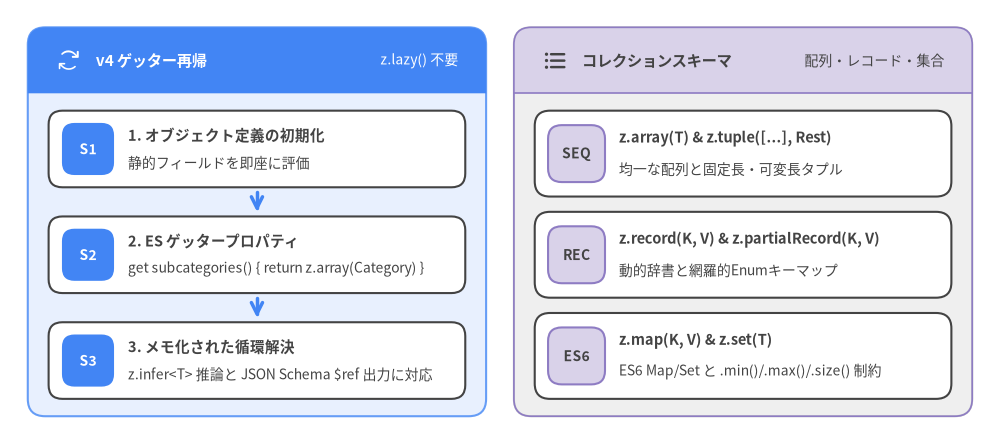
Source Code
from drawlib.canvas import save, setup
from drawlib.icons import phosphor
from drawlib.smartarts import CardList, Panel
from drawlib.styles import Styles

setup(width=144, height=64)

left_panel = Panel(
    "v4 ゲッター再帰",
    "z.lazy() 不要",
    style=Styles.PrimaryNeutral,
    header_style=Styles.PrimaryFlat,
    text_style=Styles.WhiteBold.patch(text_size=11.0),
    description_style=Styles.White.patch(text_size=10.0),
    icon=phosphor.arrows_clockwise,
    icon_style=Styles.White,
    header_variant="filled",
    header_height=9.5,
)
left_panel.draw((4.0, 4.0), width=66.0, height=56.0, align="bottom_left")
l_xy, l_w, l_h = left_panel.get_content_box(
    (4.0, 4.0), width=66.0, height=56.0, padding=(3.0, 2.5), align="bottom_left"
)

rec_cards = CardList(
    style=Styles.White,
    text_style=Styles.DarkBold.patch(text_size=10.5),
    description_style=Styles.Dark.patch(text_size=10.0),
    badge_style=Styles.PrimaryFlat,
    badge_text_style=Styles.WhiteBold.patch(text_size=10.0),
    spacing=2.2,
    show_arrows=True,
    arrow_style=Styles.PrimaryBold,
)
rec_cards.add(
    "1. オブジェクト定義の初期化",
    "静的フィールドを即座に評価",
    badge_text="S1",
)
rec_cards.add(
    "2. ES ゲッタープロパティ",
    "get subcategories() { return z.array(Category) }",
    badge_text="S2",
)
rec_cards.add(
    "3. メモ化された循環解決",
    "z.infer<T> 推論と JSON Schema $ref 出力に対応",
    badge_text="S3",
)
rec_cards.draw(l_xy, width=l_w, height=l_h)

right_panel = Panel(
    "コレクションスキーマ",
    "配列・レコード・集合",
    style=Styles.Neutral,
    header_style=Styles.SecondaryNeutral.patch(shape_line_width=1.2),
    text_style=Styles.DarkBold.patch(text_size=11.0),
    description_style=Styles.Dark.patch(text_size=10.0),
    icon=phosphor.list_bullets,
    icon_style=Styles.DarkBold,
    header_variant="filled",
    header_height=9.5,
)
right_panel.draw((74.0, 4.0), width=66.0, height=56.0, align="bottom_left")
r_xy, r_w, r_h = right_panel.get_content_box(
    (74.0, 4.0), width=66.0, height=56.0, padding=(3.0, 2.5), align="bottom_left"
)

col_cards = CardList(
    style=Styles.White,
    text_style=Styles.DarkBold.patch(text_size=10.5),
    description_style=Styles.Dark.patch(text_size=10.0),
    badge_style=Styles.SecondaryNeutral,
    badge_text_style=Styles.DarkBold.patch(text_size=10.0),
    spacing=2.2,
)
col_cards.add(
    "z.array(T) & z.tuple([...], Rest)",
    "均一な配列と固定長・可変長タプル",
    badge_text="SEQ",
)
col_cards.add(
    "z.record(K, V) & z.partialRecord(K, V)",
    "動的辞書と網羅的Enumキーマップ",
    badge_text="REC",
)
col_cards.add(
    "z.map(K, V) & z.set(T)",
    "ES6 Map/Set と .min()/.max()/.size() 制約",
    badge_text="ES6",
)
col_cards.draw(r_xy, width=r_w, height=r_h)

save()
自己参照ツリー構造の例
import { z } from "zod";

const Category = z.object({
  id: z.string(),
  name: z.string(),
  get subcategories() {
    return z.array(Category);
  },
});

type Category = z.infer<typeof Category>;
// {
//   id: string;
//   name: string;
//   subcategories: Category[];
// }

const catalogTree = Category.parse({
  id: "root",
  name: "Electronics",
  subcategories: [
    {
      id: "laptops",
      name: "Laptops",
      subcategories: [],
    },
  ],
});
相互再帰スキーマ(Mutual Recursion)
UserとPostのように互いを参照し合う相互再帰スキーマもゲッターで自然に記述でき、.extend()、.pick()、.omit()、.partial()による合成や、z.toJSONSchema()における$ref循環出力もそのまま機能します。
const User = z.object({
  id: z.uuid(),
  handle: z.string(),
  get posts() {
    return z.array(Post);
  },
});

const Post = z.object({
  id: z.uuid(),
  title: z.string(),
  get author() {
    return User;
  },
  get comments() {
    return z.array(Post);
  },
});

type User = z.infer<typeof User>;
type Post = z.infer<typeof Post>;
z.lazy()が必要になるケースは? オブジェクトプロパティを介さないトップレベルの再帰ユニオン(例:カスタムJSONユニオン型const Json: z.ZodType<JsonValue> = z.lazy(() => z.union([...])))を定義する場合のみです。なお、任意のJSON値の検証にはZod v4組み込みのz.json()が利用可能です。
3.4 配列と可変長タプル(z.array, z.tuple)
配列スキーマ(z.array)
z.array(elementSchema) または任意のスキーマ上の .array() メソッドで配列スキーマを構築します。要素数の制約には .min(n)、.max(n)、.length(n)、.nonempty() を使用します。
const TagList = z.array(z.string().min(1)).min(1).max(10);
// 同等の短縮記法: z.string().min(1).array().min(1).max(10)

// `.element` プロパティで要素スキーマを取得可能:
const SingleTag = TagList.element; // ZodString
Note: Zod v4の
.nonempty()は.min(1)と同じ動作になり、推論型を[T, ...T[]]ではなく標準のT[]として維持します。先頭要素の型が必須のタプル型[T, ...T[]]が必要な場合は、次に示す可変長タプルz.tuple([T], T)を使用してください。
固定長・可変長タプル(z.tuple)
タプルは各インデックス位置に個別のスキーマを持つ配列を検証します。Zod v4では z.tuple(items, restSchema) の第2引数(または .rest(restSchema) メソッド)によって、TypeScriptの可変長タプル [A, B, ...Rest[]] を直接表現できます。
// 固定長タプル: [string, number, boolean]
const Point2DWithFlag = z.tuple([z.string(), z.number(), z.boolean()]);

// 可変長タプル (Variadic Tuple): [string, ...number[]]
const MetricSeries = z.tuple([z.string()], z.number());
type MetricSeries = z.infer<typeof MetricSeries>;
// [string, ...number[]]

MetricSeries.parse(["cpu_load", 0.42, 0.51, 0.38]); // 有効!

// 固定位置のタプル要素をすべてオプショナル化:
const PartialPoint = Point2DWithFlag.partial();
// [(string | undefined)?, (number | undefined)?, (boolean | undefined)?]
3.5 レコード・Map・Set(z.record, z.map, z.set)
キー・バリューレコード(z.record, z.partialRecord, z.looseRecord)
Zod v4では、z.record(keySchema, valueSchema) にキースキーマとバリュースキーマの2つの引数を明示的に渡すのが標準です。
// 標準の文字列キー辞書: Record<string, number>
const FeatureScores = z.record(z.string(), z.number().min(0).max(1));

// 正規表現制約付きキー(例:環境変数名)
const EnvVars = z.record(z.string().regex(/^[A-Z_][A-Z0-9_]*$/), z.string());
キースキーマに有限の z.enum(...) やリテラルユニオンを指定した場合、Zod v4の z.record(K, V) は**すべての列挙キーの存在を必須(網羅的チェック)**とします(推論型も Record<"dev" | "staging" | "prod", string> となります)。一部のキーの省略を許容する場合や、未知のキーを無視したい場合は専用のコンストラクタを使い分けます。
| コンストラクタ | Enumキー K に対する推論型 |
キーの実行時検証ルール |
|---|---|---|
z.record(K, V) |
Record<K, V> |
K の全キーが必須。定義外のキーは拒否。 |
z.partialRecord(K, V) |
Partial<Record<K, V>> |
K の一部のキーの省略を許可。定義外のキーは拒否。 |
z.looseRecord(K, V) |
Record<string, unknown> & ... |
K に一致するキーのみ V で検証し、一致しないキーはそのまま通過。 |
const Environment = z.enum(["dev", "staging", "prod"]);

// 1. 網羅的レコード: 3つすべての環境キーが必須
const AllEndpoints = z.record(Environment, z.url());

// 2. 部分レコード: 一部の環境キーのみの指定を許可
const OverrideEndpoints = z.partialRecord(Environment, z.url());
OverrideEndpoints.parse({ dev: "https://dev.api.example.com" }); // 有効!
ネイティブES6 Map と Set(z.map, z.set)
インメモリキャッシュや重複排除されたID集合など、JavaScriptの Map および Set インスタンスを検証するには z.map(keySchema, valueSchema) と z.set(valueSchema) を使用します。どちらも .min(n)、.max(n)、.size(n)、.nonempty() による要素数制約をサポートしています。
const UserPermissionsMap = z
  .map(z.uuid(), z.set(z.enum(["read", "write", "delete"])).nonempty())
  .min(1)
  .max(1000);

type UserPermissionsMap = z.infer<typeof UserPermissionsMap>;
// Map<string, Set<"read" | "write" | "delete">>

const permissions = new Map([
  ["550e8400-e29b-41d4-a716-446655440000", new Set(["read", "write"] as const)],
]);

UserPermissionsMap.parse(permissions);
続いて 4. ユニオン・判別共用体・インターセクション に進み、$O(1)$ ディスパッチを行う判別共用体(Discriminated Union)、排他的OR(z.xor)、および .default() と .prefault() の違いを学びましょう。