2. プリミティブ・リテラル・文字列フォーマット
Zod v4.6.7は、スカラ型プリミティブ、固定幅数値スキーマ、複数値リテラル、列挙型(Enum)、テンプレートリテラル、およびファーストクラスの文字列フォーマットバリデータを幅広く提供します。Zod v4における最大の改善点のひとつは、文字列フォーマット(z.email()、z.uuid()、z.url()、z.jwt()、z.ipv4()、z.iso.datetime()など)および固定幅数値(z.int()、z.float32()、z.int64()など)がTree-Shaking可能なトップレベルコンストラクタへと昇格した点です。
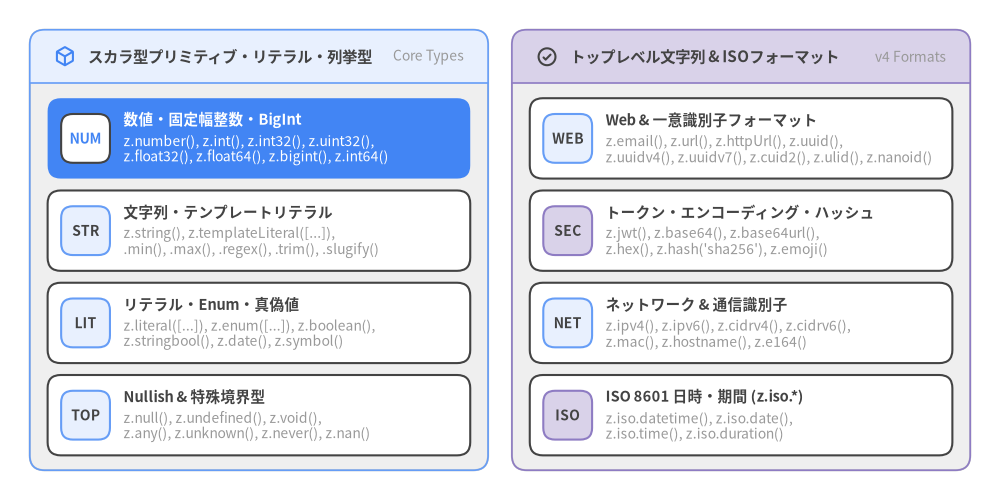
Source Code
from drawlib.canvas import save, setup
from drawlib.icons import phosphor
from drawlib.smartarts import CardList, Panel
from drawlib.styles import Styles

setup(width=168, height=84)

left_panel = Panel(
    "スカラ型プリミティブ・リテラル・列挙型",
    "Core Types",
    style=Styles.Neutral,
    header_style=Styles.PrimaryNeutral.patch(shape_line_width=1.2),
    text_style=Styles.DarkBold.patch(text_size=11.0),
    description_style=Styles.Muted.patch(text_size=10.0),
    icon=phosphor.cube,
    icon_style=Styles.PrimaryBold,
    header_variant="filled",
    header_height=9.0,
)
left_panel.draw((5.0, 5.0), width=77.0, height=74.0, align="bottom_left")
l_xy, l_w, l_h = left_panel.get_content_box((5.0, 5.0), width=77.0, height=74.0, padding=(3.0, 2.5))

left_cards = CardList(
    style=Styles.White,
    text_style=Styles.DarkBold.patch(text_size=10.5),
    description_style=Styles.Muted.patch(text_size=10.0),
    badge_shape="rounded_rect",
    badge_style=Styles.PrimaryNeutral,
    badge_text_style=Styles.DarkBold.patch(text_size=10.0),
    spacing=2.0,
)
left_cards.add(
    "数値・固定幅整数・BigInt",
    "z.number(), z.int(), z.int32(), z.uint32(),\nz.float32(), z.float64(), z.bigint(), z.int64()",
    badge_text="NUM",
    style=Styles.PrimaryFlat,
    text_style=Styles.WhiteBold.patch(text_size=10.5),
    description_style=Styles.White.patch(text_size=10.0),
    badge_style=Styles.White,
    badge_text_style=Styles.PrimaryBold.patch(text_size=10.0),
)
left_cards.add(
    "文字列・テンプレートリテラル",
    "z.string(), z.templateLiteral([...]),\n.min(), .max(), .regex(), .trim(), .slugify()",
    badge_text="STR",
)
left_cards.add(
    "リテラル・Enum・真偽値",
    "z.literal([...]), z.enum([...]), z.boolean(),\nz.stringbool(), z.date(), z.symbol()",
    badge_text="LIT",
)
left_cards.add(
    "Nullish & 特殊境界型",
    "z.null(), z.undefined(), z.void(),\nz.any(), z.unknown(), z.never(), z.nan()",
    badge_text="TOP",
)
left_cards.draw(l_xy, width=l_w, height=l_h)

right_panel = Panel(
    "トップレベル文字列 & ISOフォーマット",
    "v4 Formats",
    style=Styles.Neutral,
    header_style=Styles.SecondaryNeutral.patch(shape_line_width=1.2),
    text_style=Styles.DarkBold.patch(text_size=11.0),
    description_style=Styles.Muted.patch(text_size=10.0),
    icon=phosphor.check_circle,
    icon_style=Styles.DarkBold,
    header_variant="filled",
    header_height=9.0,
)
right_panel.draw((86.0, 5.0), width=77.0, height=74.0, align="bottom_left")
r_xy, r_w, r_h = right_panel.get_content_box((86.0, 5.0), width=77.0, height=74.0, padding=(3.0, 2.5))

right_cards = CardList(
    style=Styles.White,
    text_style=Styles.DarkBold.patch(text_size=10.5),
    description_style=Styles.Muted.patch(text_size=10.0),
    badge_shape="rounded_rect",
    badge_style=Styles.SecondaryNeutral,
    badge_text_style=Styles.DarkBold.patch(text_size=10.0),
    spacing=2.0,
)
right_cards.add(
    "Web & 一意識別子フォーマット",
    "z.email(), z.url(), z.httpUrl(), z.uuid(),\nz.uuidv4(), z.uuidv7(), z.cuid2(), z.ulid(), z.nanoid()",
    badge_text="WEB",
    badge_style=Styles.PrimaryNeutral,
)
right_cards.add(
    "トークン・エンコーディング・ハッシュ",
    "z.jwt(), z.base64(), z.base64url(),\nz.hex(), z.hash('sha256'), z.emoji()",
    badge_text="SEC",
)
right_cards.add(
    "ネットワーク & 通信識別子",
    "z.ipv4(), z.ipv6(), z.cidrv4(), z.cidrv6(),\nz.mac(), z.hostname(), z.e164()",
    badge_text="NET",
    badge_style=Styles.PrimaryNeutral,
)
right_cards.add(
    "ISO 8601 日時・期間 (z.iso.*)",
    "z.iso.datetime(), z.iso.date(),\nz.iso.time(), z.iso.duration()",
    badge_text="ISO",
)
right_cards.draw(r_xy, width=r_w, height=r_h)

save()
1. 文字列(z.string())と組み込み正規化メソッド
z.string()は入力が文字列であることを検証し、文字数制約や部分一致チェック、およびインプレースの文字列正規化(トリム・大文字小文字変換・Unicode正規化・スラッグ化)をメソッドチェーンで記述できます。
import { z } from "zod";

const UsernameSchema = z
  .string({ error: "ユーザー名は文字列で指定してください" })
  .trim() // 前後の空白を除去
  .toLowerCase() // 小文字に正規化
  .min(3, "3文字以上で入力してください")
  .max(24, "24文字以内で入力してください")
  .regex(/^[a-z0-9_]+$/, "半角英小文字・数字・アンダースコアのみ使用可能です");

// Zod v4.6.7 のその他の文字列チェック・変換メソッド:
const SlugSchema = z.string().normalize("NFC").slugify();
const PrefixSchema = z.string().startsWith("pk_live_").length(32);
const NonEmptyText = z.string().nonempty(); // .min(1) と同等
2. トップレベル文字列フォーマット(ZodStringFormat)
Zod v3では文字列フォーマットがz.string().email()のようにメソッドとして提供されていました。Zod v4.6.7では、すべての文字列フォーマットがZodStringFormatを継承する独立したトップレベル関数に昇格しています。互換性のために従来のz.string().email()も残されていますが、トップレベル関数を使うことで未使用の正規表現が本番バンドルから確実にTree-Shakeされます。
2.1 メールアドレス・URL・ネットワーク識別子
import { z } from "zod";

// 1. メールアドレス検証(z.regexes.* により正規表現ルールを切り替え可能)
const DefaultEmail = z.email();
const Html5Email = z.email({ pattern: z.regexes.html5Email });
const Rfc5322Email = z.email({ pattern: z.regexes.rfc5322Email });
const UnicodeEmail = z.email({ pattern: z.regexes.unicodeEmail });

// 2. プロトコルやホスト名を制限できる URL バリデーション
const AnyUrl = z.url();
const HttpOnlyUrl = z.httpUrl(); // http:// または https:// かつ有効なドメイン名を強制
const InternalWebhook = z.url({
  protocol: /^https$/,
  hostname: /\.internal\.example\.com$/,
});

// 3. IPアドレス、CIDRブロック、MACアドレス、E.164電話番号
const ServerNetSchema = z.object({
  ipv4: z.ipv4(),
  ipv6: z.ipv6(),
  subnetV4: z.cidrv4(), // 例: "10.0.0.0/24"
  subnetV6: z.cidrv6(),
  macAddress: z.mac({ delimiter: ":" }),
  hostname: z.hostname(),
  oncallPhone: z.e164(), // 例: "+819012345678"
});
2.2 UUID・分散ID・JWT・ハッシュ・カスタムフォーマット
// UUID(全バージョン許可、または v4 / v6 / v7 指定)
const AnyUuid = z.uuid();
const UuidV4 = z.uuidv4(); // または z.uuid({ version: "v4" })
const UuidV7 = z.uuidv7(); // 時系列ソート可能な UUIDv7

// モダンな分散一意識別子
const Cuid2Id = z.cuid2();
const UlidId = z.ulid();
const NanoId = z.nanoid();
const KsuidId = z.ksuid();

// 暗号トークン・エンコーディング・ハッシュ値
const JwtToken = z.jwt({ alg: "HS256" });
const Base64Payload = z.base64();
const Base64UrlToken = z.base64url();
const Sha256Hex = z.hash("sha256", { enc: "hex" }); // md5, sha1, sha256, sha384, sha512

// JSON Schema の `format` 属性にも反映されるカスタム文字列フォーマット定義
const SemverFormat = z.stringFormat("semver", /^\d+\.\d+\.\d+$/);
2.3 ISO 8601 日付・時刻・期間(z.iso.*)
Zod v4では、ISO 8601準拠の文字列スキーマがz.iso名前空間に整理されています。
const EventScheduleSchema = z.object({
  // ISO 8601 日時: "2026-11-10T10:30:00Z"
  // `offset: true` ("+09:00"許可), `local: true` (Z省略許可), `precision: 3` (ミリ秒桁数) を指定可能
  startsAt: z.iso.datetime({ offset: true, precision: 3 }),

  // ISO 8601 カレンダー日付: "2026-11-10"
  dateOnly: z.iso.date(),

  // ISO 8601 時刻: "10:30:00"
  timeOnly: z.iso.time({ precision: 0 }),

  // ISO 8601 期間 (Duration): "P3Y6M4DT12H30M5S"
  window: z.iso.duration(),
});
3. 数値・固定幅整数・BigInt
Zod v4では、z.number()はデフォルトでNaN、Infinity、-Infinityをすべて拒否(有限数のみ許可)する安全な設計になりました。さらに、安全な整数や32ビット整数、IEEE 754浮動小数点数、64ビットBigIntを検証する専用コンストラクタが用意されています。
| コンストラクタ | 許容される値域 | JSON Schema 変換時の出力 |
|---|---|---|
z.number() |
有限のIEEE 754 number(Number.isFinite) |
{ "type": "number" } |
z.int() |
安全な整数範囲([Number.MIN_SAFE_INTEGER, Number.MAX_SAFE_INTEGER]) |
{ "type": "integer" } |
z.int32() |
符号付き32ビット整数([-2147483648, 2147483647]) |
{ "type": "integer", "format": "int32" } |
z.uint32() |
符号なし32ビット整数([0, 4294967295]) |
{ "type": "integer", "format": "uint32" } |
z.float32() |
単精度32ビット浮動小数点数の範囲 | { "type": "number", "format": "float" } |
z.float64() |
倍精度64ビット浮動小数点数の範囲 | { "type": "number", "format": "double" } |
z.bigint() |
任意精度の bigint |
(カスタムプロセッサまたは文字列Codecを併用) |
z.int64() / z.uint64() |
符号付き/符号なし64ビット bigint 範囲 |
{ "type": "integer", "format": "int64" } |
const LineItemSchema = z.object({
  quantity: z.int().positive(), // > 0
  unitPriceCents: z.uint32().nonnegative(), // >= 0
  discountRate: z.number().gte(0).lte(1).multipleOf(0.05),
  ledgerBalance: z.int64(), // [-2^63, 2^63 - 1] の範囲を検証する `bigint`
});
4. リテラル・列挙型(Enum)・テンプレートリテラル
4.1 複数値を指定できる z.literal()
Zod v4のz.literal()は、単一のリテラル値だけでなく、リテラル配列を一括で受け取ってユニオン型を推論できます。
const Environment = z.literal("production");
const HttpSuccessCode = z.literal([200, 201, 204]); // `200 | 201 | 204` として型推論
4.2 .extract() / .exclude() を備えた z.enum()
z.enum()は文字列タプル配列とTypeScriptのenum/as constオブジェクトの両方を受け入れます(非推奨となったz.nativeEnum()を統合)。
const RoleSchema = z.enum(["owner", "admin", "member", "guest"]);
type Role = z.infer<typeof RoleSchema>; // "owner" | "admin" | "member" | "guest"

// 部分集合の Enum スキーマを宣言的に派生:
const ElevatedRole = RoleSchema.extract(["owner", "admin"]); // "owner" | "admin"
const StandardRole = RoleSchema.exclude(["owner"]); // "admin" | "member" | "guest"
4.3 z.templateLiteral()
構造化された文字列パターンを実行時に検証しつつ、TypeScriptのテンプレートリテラル型(`${number}${"px" | "rem" | "%"}`など)を正確に合成します。
const CssDimension = z.templateLiteral([
  z.number(),
  z.enum(["px", "rem", "em", "%", "vh", "vw"]),
]);

type CssDimension = z.infer<typeof CssDimension>;
// => `${number}${"px" | "rem" | "em" | "%" | "vh" | "vw"}`

CssDimension.parse("16px"); // 成功!
CssDimension.parse("1.5rem"); // 成功!
5. 型強制(z.coerce.*)と環境変数向け z.stringbool()
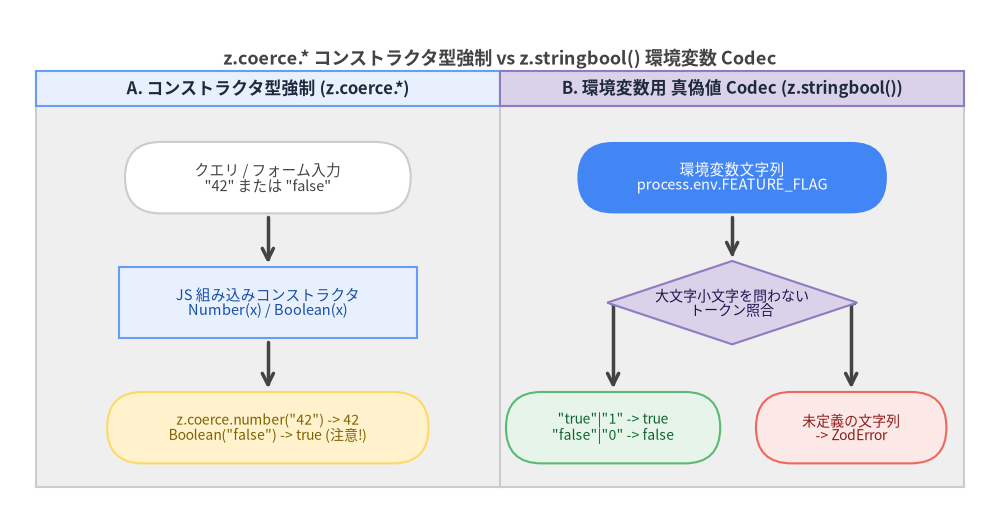
URLクエリ文字列(?page=2&limit=50)や環境変数(process.env)はすべて文字列として渡されます。Zod v4では、JavaScriptの組み込みコンストラクタでキャストする**z.coerce.*と、真偽値トークン文字列を双方向変換するz.stringbool()**の2つのアプローチを提供しています。
Source Code
from drawlib.canvas import save, setup
from drawlib.diagrams.flow import Decision, End, FlowDiagram, Process, Start
from drawlib.styles import Colors, Styles

setup(width=168, height=86)

flow = FlowDiagram(
    node_style=Styles.Neutral.patch(text_size=10.5),
    edge_style=Styles.DarkBold,
    edge_text_style=Styles.DarkBold.patch(text_size=10.0),
    title="z.coerce.* コンストラクタ型強制 vs z.stringbool() 環境変数 Codec",
    title_style=Styles.DarkBold.patch(text_size=13.0),
    width=156,
    height=70,
    lane_orientation="vertical",
)

flow.add_lane(
    "A. コンストラクタ型強制 (z.coerce.*)",
    width=78,
    style=Styles.Neutral,
    header_style=Styles.PrimaryNeutral.patch(text_size=10.5),
)
flow.add_lane(
    "B. 環境変数用 真偽値 Codec (z.stringbool())",
    width=78,
    style=Styles.Neutral,
    header_style=Styles.SecondaryNeutral.patch(text_size=10.5),
)

c_in = flow.add(
    Start(
        'クエリ / フォーム入力\n"42" または "false"',
        width=48,
        height=12,
        style=Styles.Neutral.patch(shape_fill_color=Colors.White, text_size=10.5),
    ),
    xy=(39, 52),
)
c_cast = flow.add(
    Process(
        "JS 組み込みコンストラクタ\nNumber(x) / Boolean(x)",
        width=50,
        height=12,
        style=Styles.PrimaryNeutral.patch(text_size=10.5),
    ),
    xy=(39, 31),
)
c_out = flow.add(
    End(
        'z.coerce.number("42") -> 42\nBoolean("false") -> true (注意!)',
        width=54,
        height=12,
        style=Styles.WarningNeutral.patch(text_size=10.0),
    ),
    xy=(39, 10),
)

sb_in = flow.add(
    Start(
        "環境変数文字列\nprocess.env.FEATURE_FLAG",
        width=52,
        height=12,
        style=Styles.PrimaryFlat.patch(text_color=Colors.White, text_size=10.5),
    ),
    xy=(117, 52),
)
sb_dec = flow.add(
    Decision(
        "大文字小文字を問わない\nトークン照合",
        width=42,
        height=14,
        style=Styles.SecondaryNeutral.patch(text_size=10.0),
    ),
    xy=(117, 31),
)
sb_ok = flow.add(
    End(
        '"true"|"1" -> true\n"false"|"0" -> false',
        width=36,
        height=12,
        style=Styles.SuccessNeutral.patch(text_size=10.0),
    ),
    xy=(97, 10),
)
sb_err = flow.add(
    End(
        "未定義の文字列\n-> ZodError",
        width=32,
        height=12,
        style=Styles.DangerNeutral.patch(text_size=10.0),
    ),
    xy=(137, 10),
)

c_in.connect(c_cast, padding=0.6)
c_cast.connect(c_out, padding=0.6)

sb_in.connect(sb_dec, padding=0.6)
sb_dec.connect(sb_ok, start_side="left", end_side="top", padding=0.6)
sb_dec.connect(sb_err, start_side="right", end_side="top", padding=0.6)

flow.draw(xy=(6.0, 4.0))
save()
5.1 数値や日付のキャストに便利な z.coerce.*
z.coerce.number()、z.coerce.bigint()、z.coerce.date()、z.coerce.string()は、スキーマ検証の前にJavaScriptのコンストラクタ(Number(input)、BigInt(input)、new Date(input)、String(input))を実行します。
const PaginationSchema = z.object({
  page: z.coerce.number().int().min(1).default(1),
  since: z.coerce.date().optional(),
});

PaginationSchema.parse({ page: "3", since: "2026-11-01" });
// => { page: 3, since: Date(2026-11-01T00:00:00.000Z) }
5.2 環境変数の真偽値パースに z.stringbool() を使うべき理由
z.coerce.boolean()は内部でBoolean(val)を呼ぶため、空文字以外のあらゆる文字列("false"や"0"を含む)がすべてtrueに変換されてしまいます。環境変数やCLIフラグの真偽値パースには、双方向ZodCodec<ZodString, ZodBoolean>として実装された**z.stringbool()**を使用してください。
import { z } from "zod";

// デフォルトで認識されるトークン(大文字・小文字を区別しない):
// truthy: ["true", "1", "yes", "on", "y", "enabled"]
// falsy:  ["false", "0", "no", "off", "n", "disabled"]
const EnvBool = z.stringbool();

EnvBool.parse("true"); // => true
EnvBool.parse("FALSE"); // => false
EnvBool.parse("0"); // => false
EnvBool.encode(true); // => "true" (逆方向のシリアライズもサポート!)

// 許容するトークンセットや大文字・小文字の厳密性をカスタマイズ可能:
const StrictFlag = z.stringbool({
  truthy: ["true", "1"],
  falsy: ["false", "0"],
  case: "sensitive",
});
- 次のステップ: **3. オブジェクト・コレクション・再帰スキーマ**へ進み、プリミティブ型を組み合わせてオブジェクト、レコード、タプル、再帰的データ構造を構築する方法を学びましょう。