1. インストール・Strict設定・型推論
Zod v4.6.7の設計哲学はシンプルです。**アプリケーションの境界でスキーマを1回だけ定義し、そこからコンパイル時のTypeScript型も実行時のバリデータもすべて導出する(Single Source of Truth)**ことです。本章では、zod@4.6.7のインストール方法、tsconfig.jsonにおける"strict": trueが必須である理由、z.infer<T>・z.input<T>・z.output<T>による静的型抽出、および実行時パース/Codecメソッドの使い分けを解説します。
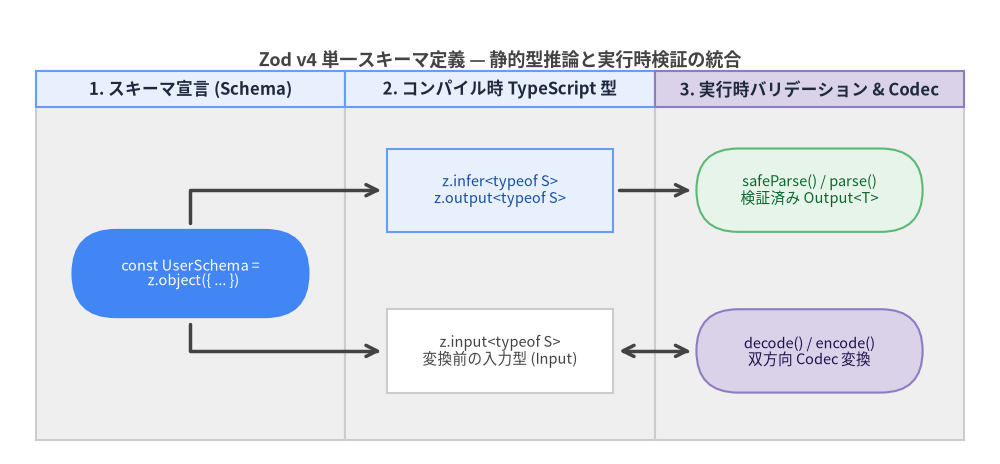
Source Code
from drawlib.canvas import save, setup
from drawlib.diagrams.flow import End, FlowDiagram, Process, Start
from drawlib.styles import Colors, Styles

setup(width=168, height=78)

flow = FlowDiagram(
    node_style=Styles.Neutral.patch(text_size=10.5),
    edge_style=Styles.DarkBold,
    edge_text_style=Styles.DarkBold.patch(text_size=10.0),
    title="Zod v4 単一スキーマ定義 — 静的型推論と実行時検証の統合",
    title_style=Styles.DarkBold.patch(text_size=13.0),
    width=156,
    height=62,
    lane_orientation="vertical",
)

flow.add_lane(
    "1. スキーマ宣言 (Schema)",
    width=52,
    style=Styles.Neutral,
    header_style=Styles.PrimaryNeutral.patch(text_size=10.5),
)
flow.add_lane(
    "2. コンパイル時 TypeScript 型",
    width=52,
    style=Styles.Neutral,
    header_style=Styles.PrimaryNeutral.patch(text_size=10.5),
)
flow.add_lane(
    "3. 実行時バリデーション & Codec",
    width=52,
    style=Styles.Neutral,
    header_style=Styles.SecondaryNeutral.patch(text_size=10.5),
)

schema = flow.add(
    Start(
        "const UserSchema =\n  z.object({ ... })",
        width=40,
        height=15,
        style=Styles.PrimaryFlat.patch(text_color=Colors.White, text_size=10.5),
    ),
    xy=(26, 28),
)

t_out = flow.add(
    Process(
        "z.infer<typeof S>\nz.output<typeof S>",
        width=38,
        height=14,
        style=Styles.PrimaryNeutral.patch(text_size=10.5),
    ),
    xy=(78, 42),
)
t_in = flow.add(
    Process(
        "z.input<typeof S>\n変換前の入力型 (Input)",
        width=38,
        height=14,
        style=Styles.Neutral.patch(shape_fill_color=Colors.White, text_size=10.5),
    ),
    xy=(78, 15),
)

r_parse = flow.add(
    End(
        "safeParse() / parse()\n検証済み Output<T>",
        width=38,
        height=14,
        style=Styles.SuccessNeutral.patch(text_size=10.5),
    ),
    xy=(130, 42),
)
r_codec = flow.add(
    End(
        "decode() / encode()\n双方向 Codec 変換",
        width=38,
        height=14,
        style=Styles.SecondaryNeutral.patch(text_size=10.5),
    ),
    xy=(130, 15),
)

schema.connect(t_out, start_side="top", end_side="left", padding=1.0)
schema.connect(t_in, start_side="bottom", end_side="left", padding=1.0)
t_out.connect(r_parse, padding=1.0)
t_in.connect(r_codec, arrow="<->", padding=1.0)

flow.draw(xy=(6.0, 4.0))
save()
1. zod@4.6.7 のインストール
Zod v4.6.7は外部の実行時依存パッケージを一切持たず(Zero Dependencies)、ESM(index.js)とCommonJS(index.cjs)のデュアルパッケージ構成によりNode.js 18+、Bun、Deno、Cloudflare Workers、モダンブラウザのすべてで動作します。
# npm
npm install zod@^4.6.7

# pnpm
pnpm add zod@^4.6.7

# bun
bun add zod@^4.6.7

# yarn
yarn add zod@^4.6.7
ファサードのインポート方法
バンドルサイズの要件やコーディングスタイルに応じて、標準のzodエントリポイントまたは軽量な関数型サブパスzod/miniを選択できます。
// Classicファサード: メソッドチェーン (.min(), .trim(), .refine(), .transform()) をフル提供
import { z } from "zod";

// Tree-shakeableファサード: プロトタイプメソッドを最小化した関数型API
import * as zm from "zod/mini";

// ライブラリ作者向けの共通コア型・内部ユーティリティ
import * as core from "zod/v4/core";
2. 必須のTypeScript設定("strict": true)
Zod v4.6.7を利用するプロジェクトでは、TypeScript 5.5以降およびtsconfig.jsonでの"strict": true(特に"strictNullChecks": true)の有効化が必須です。
{
  "compilerOptions": {
    "target": "ES2022",
    "module": "NodeNext",
    "moduleResolution": "NodeNext",
    "strict": true,
    "exactOptionalPropertyTypes": true,
    "skipLibCheck": true
  }
}
なぜ "strict": true が不可欠なのか?
"strictNullChecks": trueが無効な環境では、TypeScriptコンパイラがstring | undefinedやstring | nullをすべてstringへ吸収してしまいます。その結果、以下の問題が発生します。
z.string().optional()で定義したプロパティがz.infer<typeof Schema>上で必須プロパティと区別できなくなる。z.string().nullable()のnull許容性がコンパイル時に失われる。- さらにZod v4では
"exactOptionalPropertyTypes": trueにも完全対応しており、.exactOptional()を用いることで「キー自体の省略({})」と「明示的なundefinedの代入({ key: undefined })」を厳密に区別できます。
3. 実行時パース&Codecメソッド一覧
すべてのZodスキーマは、例外スロー有無(Throwing / Safe)、同期・非同期(Sync / Async)、および単方向パース/双方向Codec変換の組み合わせからなる実行メソッドを備えています。
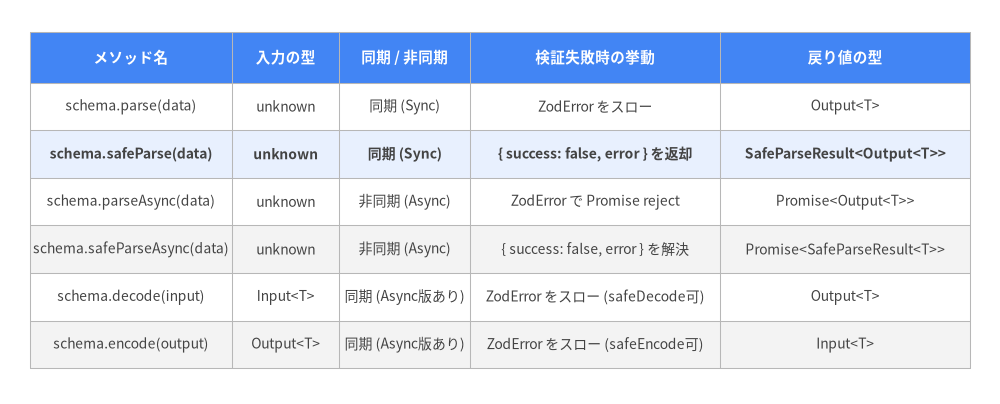
Source Code
from drawlib.canvas import save, setup
from drawlib.smartarts import Table
from drawlib.styles import Colors, Styles

setup(width=168, height=68)

table = Table(
    cell_style=Styles.White,
    text_style=Styles.Dark.patch(text_size=10.0),
    header_cell_style=Styles.PrimaryFlat,
    header_text_style=Styles.WhiteBold.patch(text_size=10.5),
    border_style=Styles.MutedThin,
)

table.set_style_cell_evenodd(
    even_color=Colors.Light,
    even_text_style=Styles.Dark.patch(text_size=10.0),
    odd_color=Colors.White,
    odd_text_style=Styles.Dark.patch(text_size=10.0),
)

table.set_style_cell(
    background_color=Colors.Primary1,
    text_style=Styles.DarkBold.patch(text_size=10.0),
    rows=[2],
)

table.set_style_cell_header(
    background_color=Colors.Primary,
    text_style=Styles.WhiteBold.patch(text_size=10.5),
)

data = [
    ["メソッド名", "入力の型", "同期 / 非同期", "検証失敗時の挙動", "戻り値の型"],
    ["schema.parse(data)", "unknown", "同期 (Sync)", "ZodError をスロー", "Output<T>"],
    ["schema.safeParse(data)", "unknown", "同期 (Sync)", "{ success: false, error } を返却", "SafeParseResult<Output<T>>"],
    ["schema.parseAsync(data)", "unknown", "非同期 (Async)", "ZodError で Promise reject", "Promise<Output<T>>"],
    ["schema.safeParseAsync(data)", "unknown", "非同期 (Async)", "{ success: false, error } を解決", "Promise<SafeParseResult<T>>"],
    ["schema.decode(input)", "Input<T>", "同期 (Async版あり)", "ZodError をスロー (safeDecode可)", "Output<T>"],
    ["schema.encode(output)", "Output<T>", "同期 (Async版あり)", "ZodError をスロー (safeEncode可)", "Input<T>"],
]

table.draw_flexible(
    xy=(5.0, 62.5),
    column_widths=[34.0, 18.0, 22.0, 42.0, 42.0],
    row_heights=[8.5, 8.0, 8.0, 8.0, 8.0, 8.0, 8.0],
    data=data,
    align="top_left",
)

save()
3.1 .parse(data) と .safeParse(data) の使い分け
上位のエラーハンドリングミドルウェア等で一括捕捉したい場合は.parse(data)を使用し、フォーム入力やAPIリクエストなど不正データの流入が日常的に起こり得る箇所では例外をスローしない判別共用体(ZodSafeParseResult<T>)を返す.safeParse(data)を使用します。
import { z } from "zod";

const PortSchema = z.int().min(1).max(65535);

// 1. 例外スロー型 parse: 成功時は `number` を返し、失敗時は `ZodError` を投げる
try {
  const port = PortSchema.parse(8080); // 8080
} catch (err) {
  if (err instanceof z.ZodError) {
    console.error(err.issues);
  }
}

// 2. 判別共用体型 safeParse: 例外を一切スローしない
const res = PortSchema.safeParse("8080");
if (!res.success) {
  // `res` は `ZodSafeParseError<number>` に型絞り込みされる
  console.error(z.prettifyError(res.error));
} else {
  // `res` は `ZodSafeParseSuccess<number>` に型絞り込みされる
  const validPort: number = res.data;
}
3.2 非同期バリデーション(parseAsync & safeParseAsync / spa)
スキーマ内のリファインメント(.refine(async (val) => ...))、変換(.transform(async (val) => ...))、またはCodecがPromiseを返す場合、同期版の.parse()や.safeParse()を呼ぶと実行時にZodAsyncErrorがスローされます。非同期チェックを含む場合は必ず.parseAsync()、.safeParseAsync()、またはその短縮エイリアスである.spa()を呼び出してください。
const UniqueUsername = z
  .string()
  .min(3)
  .refine(
    async (username) => {
      const taken = await db.users.exists({ username });
      return !taken;
    },
    { error: "このユーザー名は既に登録されています" }
  );

// `.spa()` は `.safeParseAsync()` の公式ショートハンド
const check = await UniqueUsername.spa("colinhacks");
3.3 型ガード専用メソッド(.validate() & .validateAsync())
Zod v4では、値の変換やZodErrorインスタンスの生成を行わず、TypeScriptの型述語(data is z.input<typeof schema>)として真偽値のみを高速に判定する.validate()メソッドも提供されています。
const ConfigSchema = z.object({ host: z.string(), port: z.int() });

function connectIfValid(raw: unknown) {
  if (ConfigSchema.validate(raw)) {
    // `raw` は `{ host: string; port: number }` 型に絞り込まれる
    console.log(`Connecting to ${raw.host}:${raw.port}`);
  }
}
4. 静的型の抽出(z.infer, z.input, z.output)
すべての$ZodType<Output, Input>インスタンスは、内部的に2つの型パラメータを保持しています。
Output:.parse()や.decode()が返す、デフォルト値適用後・変換後の最終的な型。Input:.decode()や.encode()が扱う、変換処理やデフォルト値適用前の入力型。
import { z } from "zod";

const SearchQuerySchema = z.object({
  q: z.string().trim().min(1),
  page: z.int().min(1).default(1),
  tags: z
    .string()
    .transform((s) => s.split(",").filter(Boolean))
    .default([]),
});

// 1. z.input<T>: デフォルト適用や transform 実行前に呼び出し側が渡せる型
type SearchQueryInput = z.input<typeof SearchQuerySchema>;
// => {
//   q: string;
//   page?: number | undefined;
//   tags?: string | undefined;
// }

// 2. z.output<T>(z.infer<T> と完全に同一): .parse() 完了後に得られる型
type SearchQueryOutput = z.output<typeof SearchQuerySchema>;
type SearchQuery = z.infer<typeof SearchQuerySchema>;
// => {
//   q: string;
//   page: number;
//   tags: string[];
// }
型推論のベストプラクティス
z.infer<typeof S>とz.output<typeof S>は同一: どちらもスキーマの出力型S["_zod"]["output"]を抽出します。InputとOutputが分岐するケース:.default(...)、.prefault(...)、.catch(...)、.transform(...)、またはz.codec(...)を使用すると入力型と出力型が異なります。APIクライアントの送信パラメータ型にはz.input<typeof S>を、バリデーション通過後のドメインロジック引数にはz.infer<typeof S>を使用すると型安全性が最大化されます。- 次のステップ: **2. プリミティブ・リテラル・文字列フォーマット**へ進み、Zod v4で強化されたスカラ型、トップレベル文字列フォーマット検証、テンプレートリテラル、型強制(Coercion)を学びましょう。